USB C Docking Station Dual Monitor, 13-in-1, Dual HDMI, DP, 65W, Gigabit Ethernet Review (2026)
Updated September 14, 2026 · Research-based review
Our verdict
This 13-in-1 USB-C dock packs dual HDMI, a DisplayPort, Gigabit Ethernet and 65W charging into a compact block for Windows laptops with a USB-C or Thunderbolt port. It suits dual-monitor setups from a single cable, though the second HDMI output is capped at 1080p and 65W will not fast-charge higher-power laptops.
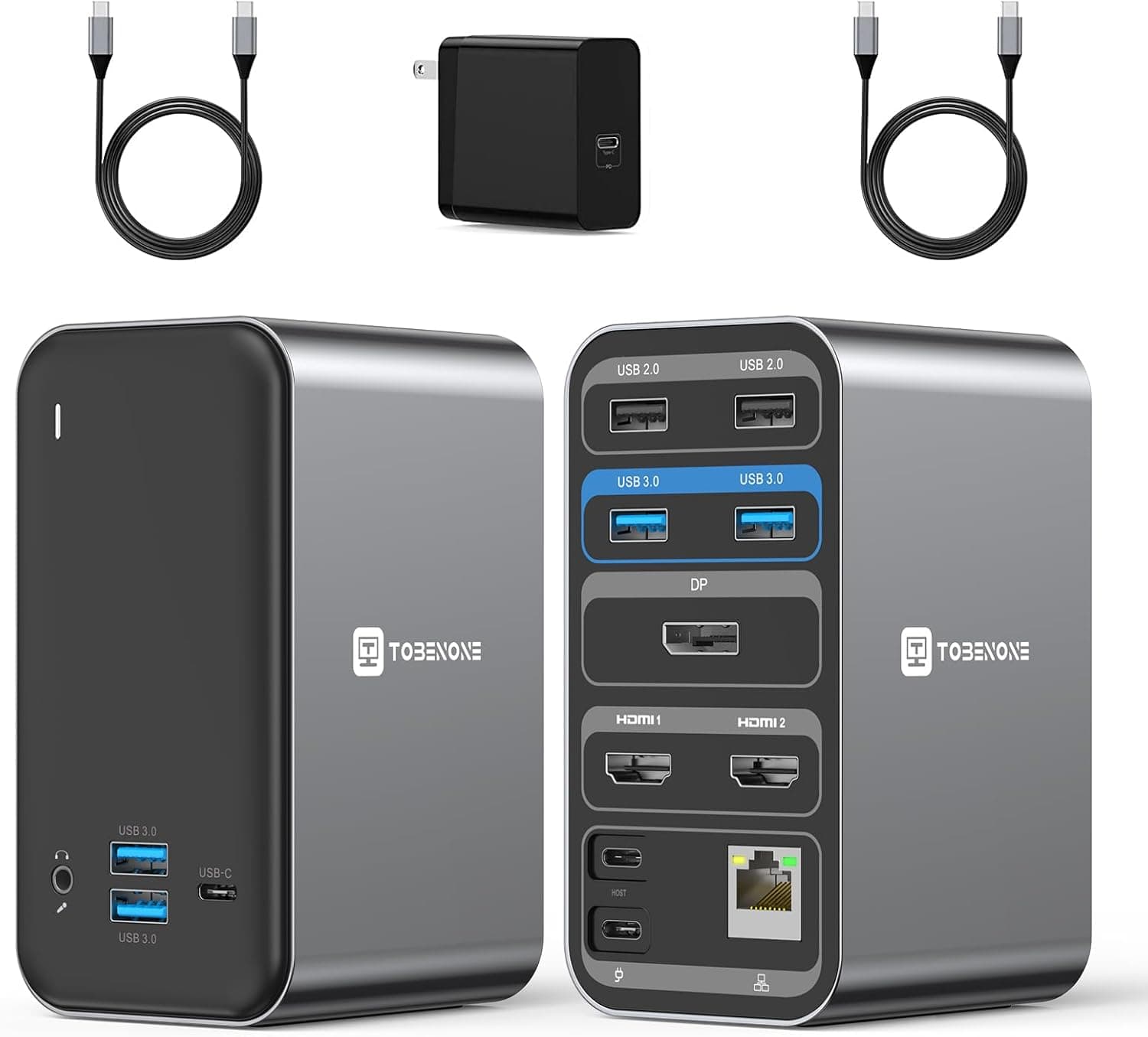
A 13-in-1 USB C docking station for dual monitors with dual HDMI, DP, 65W charging and Gigabit Ethernet.
Price range: See on Amazon
What we liked
- + 65W charging passthrough powers most ultrabooks while docked
- + Gigabit Ethernet provides fast wired internet for large uploads
- + Dual HDMI plus DP allows two monitors with varied cables
Trade-offs
- - 65W limit can slow charging on high-end laptops
- - Keep the dock in a ventilated spot since multi-port hubs run warm under load
Who this docking station fits
This dock targets Windows laptop users who want to drop one USB-C cable into a hub and immediately get two external monitors, wired internet and extra USB ports, rather than juggling separate adapters. The maker lists compatibility with laptops carrying a full-featured USB-C or Thunderbolt 3 or 4 port, including machines like the Lenovo ThinkPad T590, Dell Latitude 7370, Dell XPS 15, HP EliteBook 1040 G4 and Surface Pro 7. It fits a home office desk where the laptop docks and undocks daily, since setup is plug and play with no drivers needed. Mac users and anyone needing more than two external displays should look elsewhere, as this dock is built and marketed specifically around Windows dual-monitor extension.
Ports and power explained
The dock spreads 13 total connections across front and back: a 3.5mm audio jack, two USB 3.0 ports and a data-only USB-C port sit on the front for easy reach, while the rear holds two USB 2.0 ports, two more USB 3.0 ports, one DisplayPort, two HDMI ports, Gigabit Ethernet, a USB-C host connection and the USB-C power input. DisplayPort and the first HDMI output support up to 4K at 60Hz, but the second HDMI output is limited to 1080p at 60Hz, so a genuine dual-4K setup is not possible through this dock. The included 65W USB-C power adapter feeds the dock itself and passes roughly 50 to 60W to the connected laptop, which covers most ultrabooks but falls short of full-speed charging on power-hungry workstations.
Living with it day to day
At 4.9 by 2.9 by 2.5 inches and 1.5 pounds, the dock is small enough to sit on a desk or tuck behind a monitor without taking up much room, and the front-facing USB and audio ports make it easy to plug in headphones or a flash drive without reaching behind a screen. Gigabit Ethernet is a genuine upgrade over Wi-Fi for large file transfers or video calls on unreliable networks. Because the dock draws its own power from the included adapter rather than only the laptop, it can run peripherals even when the host laptop is asleep in some configurations. The maker backs the dock with a 2-year warranty, longer than many budget hubs in this category offer.
Trade-offs and how it compares with rivals in this guide
Against the higher-ranked Plugable Universal Docking Station, which also handles 4K dual monitors over DisplayPort or HDMI with USB-C or USB 3.0 input, this dock's mismatched HDMI outputs are a clear step down for anyone wanting two full 4K screens. The Selore 14-in-1 dock in this guide pushes 100W of power delivery and supports three monitors, a meaningfully bigger upgrade path for buyers who expect to add a third display later. Where this dock holds its own is price-to-port count for a strictly dual-monitor Windows setup, since 13 ports and Gigabit Ethernet for 65W-class charging is a reasonable bundle if a third monitor and full 4K on both outputs are not requirements.
Verdict and who should pick something else
This dock earns its middle-of-guide score of 7.6 out of 10 by covering the core needs of a two-monitor Windows home office setup with wired internet and a healthy port spread, backed by a 2-year warranty. It is not the pick for anyone who wants matched 4K output on both external displays, expects to add a third monitor down the line, or owns a high-wattage laptop that needs more than 65W to charge quickly while docked. Buyers in any of those situations should look at the Selore or HODO docks higher in this guide, while anyone with more modest needs and a compatible Windows laptop will likely find this dock does the job without fuss.
Frequently asked questions
Can this dock run two 4K monitors at once?
No. DisplayPort and the first HDMI port support 4K at 60Hz, but the second HDMI port is limited to 1080p at 60Hz, so true dual-4K is not possible.
Will this dock fully charge my laptop while docked?
It supplies roughly 50 to 60W of the 65W adapter's output to the laptop, which is enough for most ultrabooks but may not fast-charge higher-wattage laptops.
Does this dock work with a Mac?
The manufacturer markets and lists compatibility for Windows laptops with a full-featured USB-C or Thunderbolt 3 or 4 port; Mac compatibility is not part of the stated support list.
What warranty comes with this docking station?
The manufacturer backs it with a 2-year limited warranty.
Prices change often, so check the current price and availability on Amazon.
Check price on AmazonDesk Upgrade Nest may earn a commission from the link above.