Selore USB C Docking Station Dual Monitor, 14-in-1, 3 Monitors, 2 HDMI, VGA, 100W PD Review (2026)
Updated September 14, 2026 · Research-based review
Our verdict
A budget-friendly way to add three external displays and 100W charging to a single USB-C cable, with VGA support that keeps older monitors usable. The catch is that triple-display output depends on the laptop's chipset and OS, so confirm your own device supports it before assuming full 3-monitor extend mode.
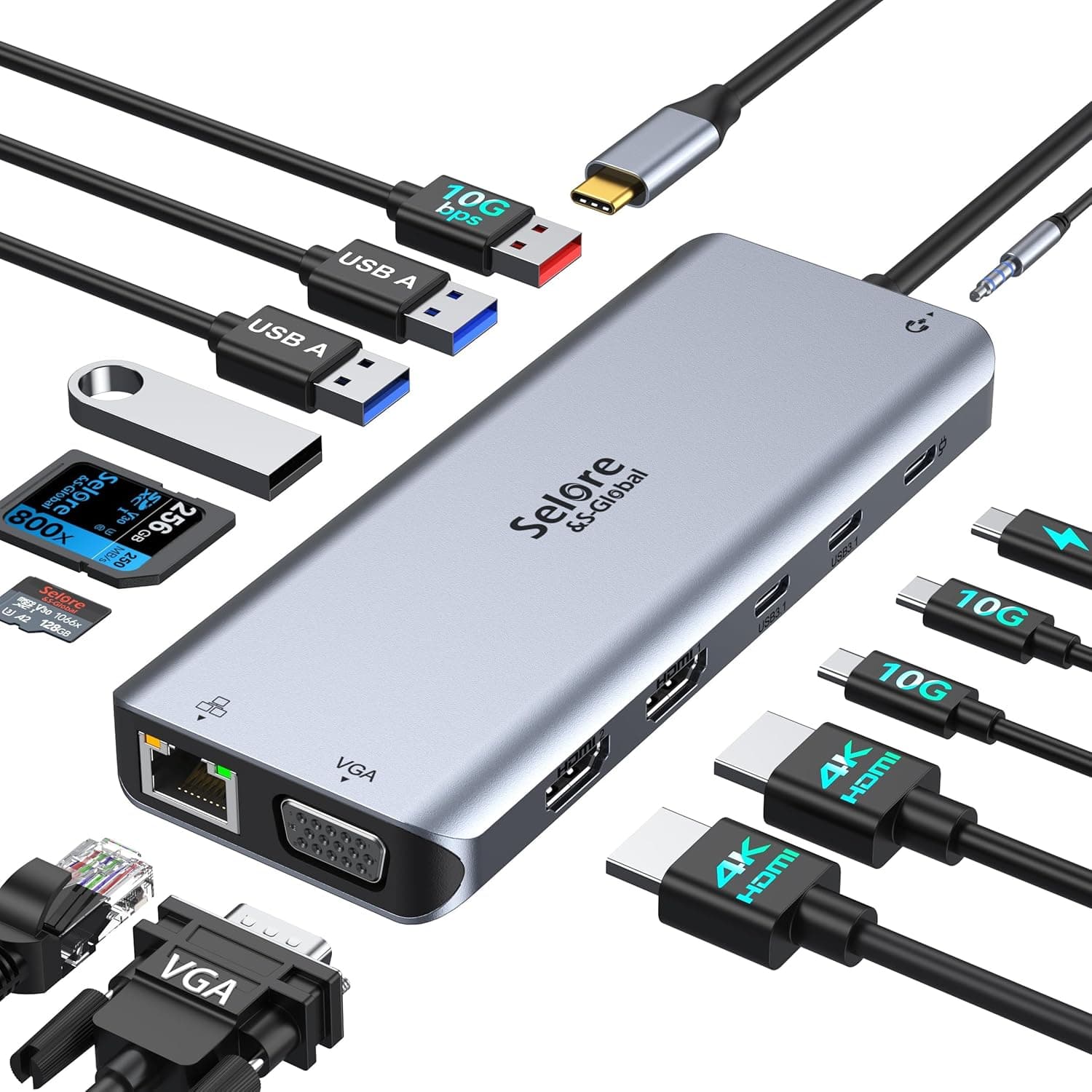
Selore 14-in-1 USB C docking station for 3 monitors with 2 HDMI, VGA and 100W PD charging.
Price range: See on Amazon
What we liked
- + 100W PD input supports charging for power-hungry laptops
- + 3 monitors via HDMI and VGA suit older displays too
- + 14-in-1 layout covers most desk connection needs
Trade-offs
- - VGA output looks softer than digital HDMI on modern screens
- - Triple display mode depends on laptop and OS support
Who this docking station is for
This Selore dock is built for a single desk where one USB-C or Thunderbolt laptop needs to reach several monitors, a wired network connection and charging power through one cable. Remote workers who want to plug in once each morning and have everything from external keyboards to a printer already connected benefit the most from a 14-in-1 layout like this. It is also a fit for anyone still running one older monitor over VGA alongside newer HDMI screens, since mixed monitor ages are common in home offices built up over several years. Because it relies on the laptop's own DisplayPort Alternate Mode output, it suits people with a modern Windows ultrabook or a Thunderbolt-equipped MacBook more than older laptops without USB-C video support.
Ports, power and display support explained
The dock packs two HDMI outputs and one VGA port for video, a Gigabit Ethernet jack, SD and microSD card slots, a handful of USB-A and USB-C data ports, and a USB-C input that accepts up to 100W of power delivery, with roughly 85W passed through to the laptop for safety. On Windows machines with the right graphics driver, all three video outputs can run as extended desktops at once, giving genuine triple-monitor productivity from a single cable. Apple silicon Macs are more limited: macOS only mirrors the same image to multiple external displays rather than extending across three independent ones, a restriction set by Apple rather than the dock itself. VGA is included mainly for backward compatibility, so image quality there will look softer than the digital HDMI outputs on a modern screen.
Setting it up and using it daily
Installation is plug and play, with no drivers to install on either Windows or macOS, which keeps first-time setup to just connecting one USB-C cable from the laptop. Once configured, the dock becomes a permanent hub, so daily use is a single cable connect and disconnect rather than plugging in monitors, network and chargers individually. The 100W input is enough to keep most modern ultrabooks charged during a full workday of dual or triple monitor use, though very power-hungry gaming laptops may still draw more than the dock can fully replace. Because the SD and card readers sit on the housing itself, photographers offloading camera cards can skip a separate reader entirely, and the Ethernet port is a genuine upgrade over relying on WiFi for video calls.
Limitations and how it compares with rivals
Our score of 8.1 out of 10 reflects the strong port count for the price, but triple-monitor support is the area to manage expectations around, since it depends on the laptop and operating system rather than being assured out of the box. Against the Plugable Universal Docking Station, which ranks slightly higher in the same guide, this Selore unit offers more ports for a similar price but with a less established support history. The StarTech dock in the same comparison caps power delivery at 60W rather than 100W, so this Selore model has an edge for charging larger laptops, while StarTech's brand backing may appeal to buyers who prioritize warranty support over raw port count. VGA output will always trail HDMI or DisplayPort in sharpness, so anyone pairing three modern 4K screens should lean on the HDMI ports rather than VGA.
Verdict and who should pick something else
This dock is a reasonable choice for anyone who wants a high port count and strong charging power at a mid-range price, particularly if one of the three monitors is an older VGA display that needs to stay in service. Buyers who need reliable triple extended displays on a MacBook should look elsewhere, since that limitation comes from macOS itself and no dock can fully work around it on Apple silicon. Anyone who mainly needs dual 4K monitors and prioritizes established brand support over extra ports may prefer the Plugable or StarTech options in the same comparison instead. For a typical Windows-based home office with mixed-age monitors, this is a practical, well-equipped pick.
Frequently asked questions
Can this dock run three external monitors on a MacBook?
On Apple silicon Macs it can output to multiple displays, but macOS mirrors the same image across them rather than extending three independent desktops, which is a macOS limitation rather than a fault of the dock.
Does the dock fully charge a laptop while driving three monitors?
It accepts up to 100W of input and passes through roughly 85W to the connected laptop, which keeps most ultrabooks charged during typical use, though larger gaming laptops may still need their own charger some of the time.
Do I need to install drivers to use this docking station?
No, it is designed as a plug and play device on both Windows and macOS, so no separate driver installation is required for the standard ports.
Will the VGA port work with a modern 4K monitor?
VGA carries an analog signal, so it will display an image on a 4K screen but at lower sharpness than the HDMI ports, making it better suited to an older secondary monitor.
Prices change often, so check the current price and availability on Amazon.
Check price on AmazonDesk Upgrade Nest may earn a commission from the link above.