Plugable Universal Laptop Docking Station, 4K Dual Monitor, DisplayPort/HDMI, USB-C or USB 3.0 Review (2026)
Updated September 14, 2026 · Research-based review
Our verdict
A dependable pick for anyone juggling laptops across Windows, Mac and Chromebooks who wants two extra monitors from a single cable. It runs over USB-C or USB 3.0 instead of a native video port, so it needs a display driver and can lag a bit more, matching our score of 8.4 out of 10.
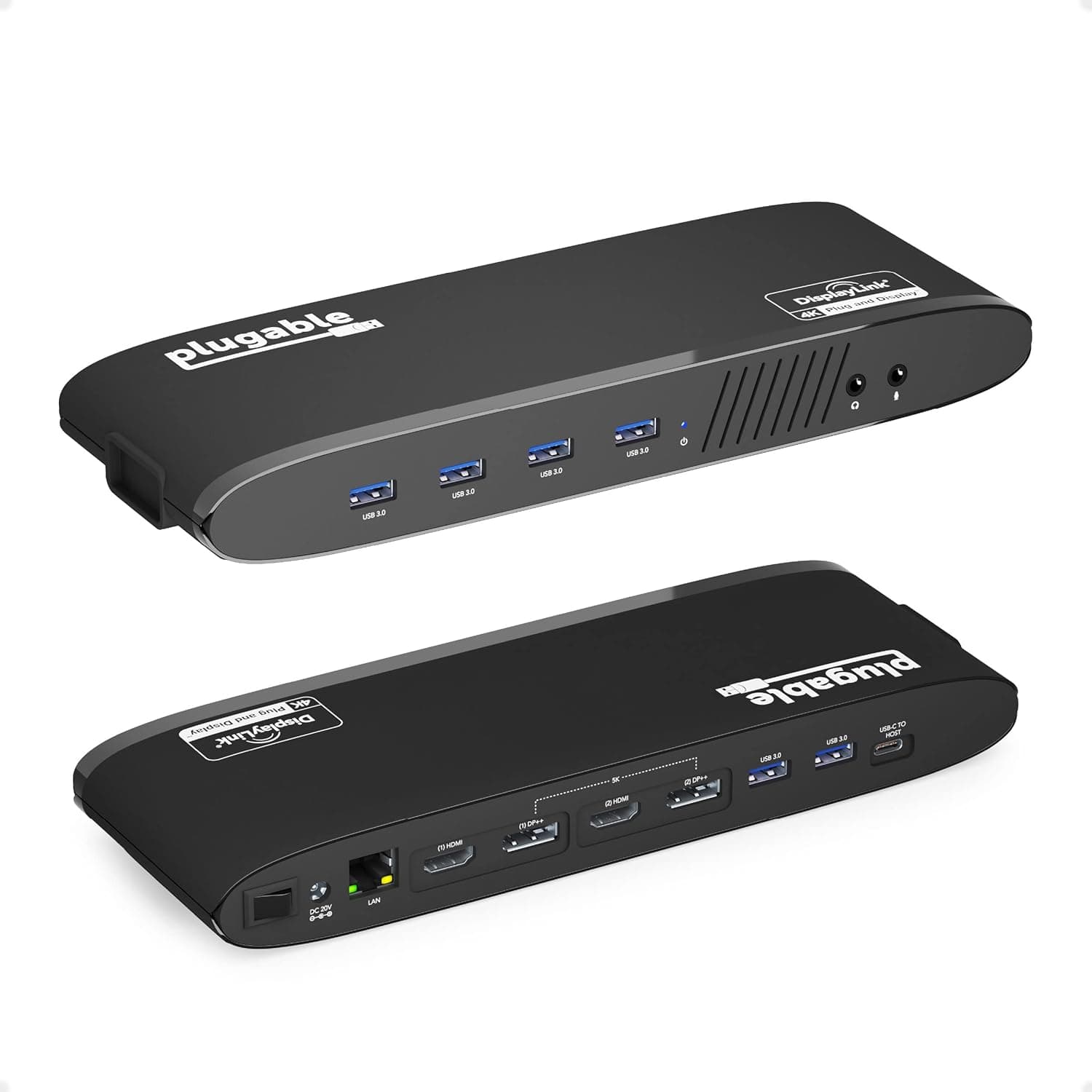
Plugable universal laptop docking station with 4K dual monitor output over DisplayPort/HDMI, using USB-C or USB 3.0.
Price range: See on Amazon
What we liked
- + Works over USB-C or USB 3.0, so older laptops can use it too
- + 4K dual monitor support drives two external displays at once
- + Plugable is a respected dock brand with good driver support
Trade-offs
- - Universal docks rely on display drivers that need installing
- - Video over USB can lag in fast gaming compared with native ports
Who this dock is built for
Plugable's universal dock targets anyone who works across more than one laptop, or a laptop that changes hands between family members, since it connects over USB-C or USB 3.0 rather than a proprietary port tied to one brand. That makes it a fit for households and small offices running a mix of Windows machines, Macs and Chromebooks, where a docking station tied to one laptop's exact port layout would leave someone out. Freelancers and remote workers who want a permanent two-monitor setup at a desk, then unplug down to a single cable when the laptop travels, are the core audience. It is less suited to a single dedicated workstation where a laptop never leaves its dock, since a native Thunderbolt or USB-C alt-mode dock can usually push video with less setup and fewer driver updates to manage over time.
How the 4K dual-monitor connection actually works
Rather than routing video through the laptop's own graphics port, this dock encodes video over the USB connection and decodes it on the dock side into DisplayPort or HDMI output for two external monitors, with combined resolution up to 4K. That is what lets it work over plain USB 3.0 on older laptops as well as USB-C on newer ones, since the laptop only needs to see a USB device, not a video-capable port. Alongside the two monitor outputs, the dock adds six USB ports, a Gigabit Ethernet jack and headphone and microphone jacks, turning a single cable into a full desk setup. The tradeoff for that flexibility is software: Windows, Mac and ChromeOS machines all need a display driver installed before the extra monitors show up, and the dock does not charge the host laptop, so a separate charger is still needed.
Setting it up and living with it day to day
Getting started means installing the display driver once per laptop, then plugging in the single dock cable each time afterward to bring back both monitors, Ethernet and any wired peripherals. Because Plugable has built docks like this for years, the driver is generally stable and gets updates rather than being abandoned after launch, which matters more here than on native-video docks since the whole two-monitor experience depends on it staying current. Day to day, the six USB ports are enough for a keyboard, mouse, webcam and a couple of storage drives without needing a separate hub, and the wired Ethernet jack is a genuine upgrade over relying on Wi-Fi for video calls. Multiple people in one household can each install the driver on their own laptop and share the same dock and monitors without buying separate hardware for each person.
Where it falls short next to native-port docks
The main compromise of a USB-based dock is video performance in fast-moving content: everyday office work, browsers and video calls look fine, but fast-scrolling content or gaming on the external displays can show more lag than a laptop with native DisplayPort or Thunderbolt output driving the same monitors directly. A rival like the StarTech MST30C2DPPD docks over USB-C alt mode with 60W power delivery built in, which can mean a cleaner video path and laptop charging in one cable, but only on laptops whose USB-C port actually supports that alt mode, which not every machine does. Plugable's approach trades some native video quality for broader compatibility, which is the right tradeoff for a shared or multi-device setup and the wrong one for a single modern USB-C laptop that already supports alt-mode video and charging.
Verdict and who should look elsewhere
This dock earns its place for mixed-device households and remote workers who need two extra monitors, wired Ethernet and a stack of USB ports from one cable, especially when the laptop involved is older or does not support USB-C video alt mode. Anyone with a single modern USB-C laptop that already supports DisplayPort alt mode and power delivery may get a cleaner, driver-free experience from a native USB-C hub or dock instead, and gamers who want minimal lag on external monitors should look at native-port options rather than a USB-encoded one. For everyone else juggling a laptop that travels between desks or users, it remains a practical way to get a permanent two-monitor setup without being locked to one machine or one operating system.
Frequently asked questions
Does this dock charge my laptop while it is connected?
No. Plugable builds the dock to add displays and ports, not to charge the host laptop, so you still need your laptop's own charger connected separately.
Do I need to install software before the monitors work?
Yes. The dock relies on a display driver, so you install it on Windows, Mac or ChromeOS the first time before the extra displays and audio work correctly.
Can two different laptops share the same dock and monitors?
Yes, since it connects over standard USB-C or USB 3.0 rather than a laptop-specific port, any laptop with the driver installed can use the same dock and monitor setup.
Will it work well for gaming on the external monitors?
It can display games, but fast motion may show more lag than a laptop's native video output, so it suits office work and video calls better than competitive gaming.
Prices change often, so check the current price and availability on Amazon.
Check price on AmazonDesk Upgrade Nest may earn a commission from the link above.