KOOSTONE Monitor Light Bar, 3 Color Modes, 10 Brightness, USB Powered Review (2026)
Updated September 21, 2026 · Research-based review
Our verdict
The KOOSTONE monitor light bar suits anyone who works late at a laptop or thin monitor and wants glare-free light without a bulky desk lamp. Its 54 LED array and 450 lumen output cover a keyboard well, but the narrow screen clip means checking your display's thickness before buying.
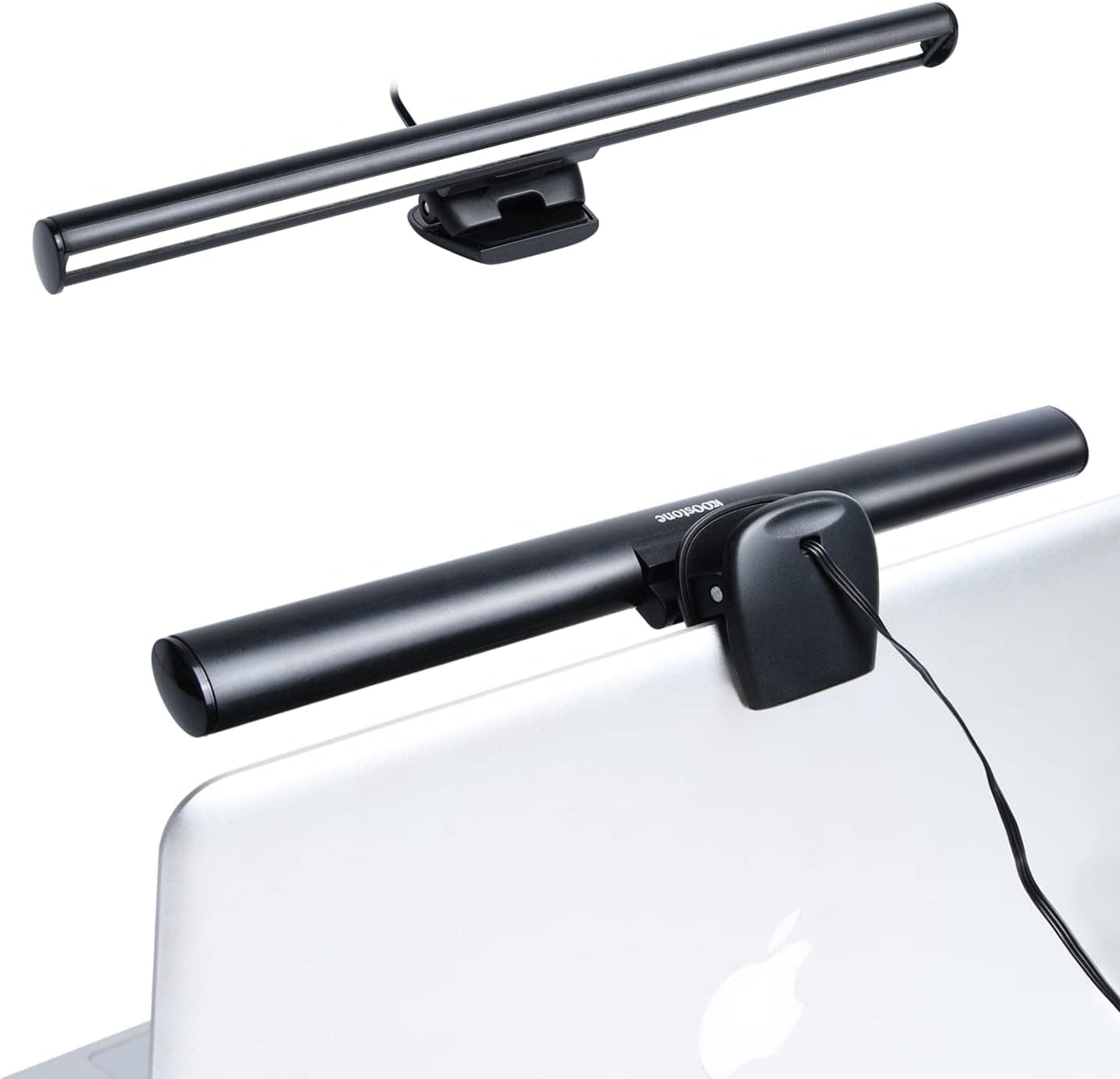
KOOSTONE USB powered monitor light bar with 3 color modes and 10 brightness levels for evening and daytime work.
Price range: See on Amazon
What we liked
- + 10 brightness levels allow finer control than basic light bars
- + 3 color modes cover reading, writing and screen work
- + USB powered design needs no wall plug or adapter
Trade-offs
- - Clip fit on curved or very thick monitors should be checked
- - No auto-dimming sensor for changing room light
Who this light bar is really for
The KOOSTONE is aimed at people who want a compact, USB-powered light source clipped to the top of a screen rather than a freestanding desk lamp taking up space. Its listed dimensions are about 10.2 inches long, under an inch tall, and roughly 0.67 inch thick, so it sits flush against a laptop lid or slim monitor bezel without adding much bulk. Because it draws power over USB, it works from a laptop port, a USB hub, or a wall adapter, which makes it a reasonable fit for dorm rooms, small apartments, and anyone who does not want another cable running to an outlet. Users who already have a full-size desk lamp probably will not need this, but for a second light source aimed specifically at keyboard and desk illumination, it covers the basics without complicating a small setup.
Brightness, color modes and glare control
The bar uses 54 LED bulbs rated for roughly 50,000 hours of use, spread across 3 color temperature modes with 10 brightness levels for each, which is enough range to move between a warm evening tone and a cooler daytime setting. Manufacturer figures put maximum output around 450 lumens, aimed down at the keyboard and desk through an asymmetric optical design meant to keep light off the screen itself and reduce reflected glare. Controls sit on the USB cable as touch buttons, so there is no separate remote to lose track of. For anyone who reads or types for long stretches after dark, having ten brightness steps rather than a simple on or off switch makes it easier to dial in a comfortable level instead of settling for something too bright or too dim.
Fit and mounting on your screen
This is the area where buyers need to pay the closest attention. The clip is designed for screens between roughly 0.16 and 0.47 inch thick, which covers most laptop lids and many slim monitor bezels, but will not clamp securely onto a thicker curved gaming monitor or an older bulky display. The site's own caution about checking clip fit on curved or very thick monitors lines up with this narrow thickness range, so it is worth measuring your screen edge before ordering rather than assuming a universal fit. On a compatible screen, the clip is built so it will not block a built-in laptop camera, which matters for anyone who takes video calls throughout the day.
Everyday usability and desk fit
At roughly 80 grams, the bar is light enough that a properly fitted clip should hold it without pulling a laptop lid backward or adding noticeable weight to a monitor edge. Because control buttons live on the cable rather than the bar itself, they stay within easy reach on the desk instead of requiring a reach up to the top of the screen. There is no listed ambient light sensor, so brightness has to be adjusted by hand as the room gets darker or lighter through the day, which is a minor inconvenience next to pricier bars that dim automatically. For a simple, no-frills task light aimed at a single screen and keyboard, it does the core job without extra smart features.
Where it lands against rival light bars
Inside a lineup of monitor light bars this one sits in the middle of the pack, offering solid brightness range and color mode flexibility without matching the auto-dimming sensors or wider light spread of some higher-scoring competitors. It makes the most sense for buyers on a tighter budget who mainly want adjustable light over a keyboard and do not need automatic brightness adjustment or a wider beam for a large curved display. Anyone weighing this against pricier bars should think about how often lighting conditions change in their room, since that is the main feature gap here, and whether the thinner clip actually matches their screen's edge thickness.
Frequently asked questions
Will the KOOSTONE light bar fit a thick curved monitor?
It is built for screens roughly 0.16 to 0.47 inch thick, so a thick curved gaming monitor may sit outside that range. Measure the top edge of your screen before ordering.
Does it block a laptop webcam?
The clip is designed to sit above the screen without covering a built-in camera, according to the manufacturer listing, though placement can vary slightly by laptop model.
How is it powered?
It runs off USB power, so it can plug into a laptop port, a powered USB hub, or a USB wall adapter rather than needing a dedicated outlet.
Does it automatically adjust brightness for the room?
No, there is no listed ambient light sensor. Brightness and color temperature are set manually using the touch controls on the cable.
Prices change often, so check the current price and availability on Amazon.
Check price on AmazonDesk Upgrade Nest may earn a commission from the link above.