Quntis Computer Monitor Light Bar, USB Reading LED Task Lamp with Auto-Dimming Review (2026)
Updated September 21, 2026 · Research-based review
Our verdict
A practical pick for anyone who wants task lighting on a desk without a lamp base eating up space, since it clips onto the top of the monitor instead. Auto-dimming keeps brightness sensible through the day, though very thin or curved monitor bezels may need checking before buying.
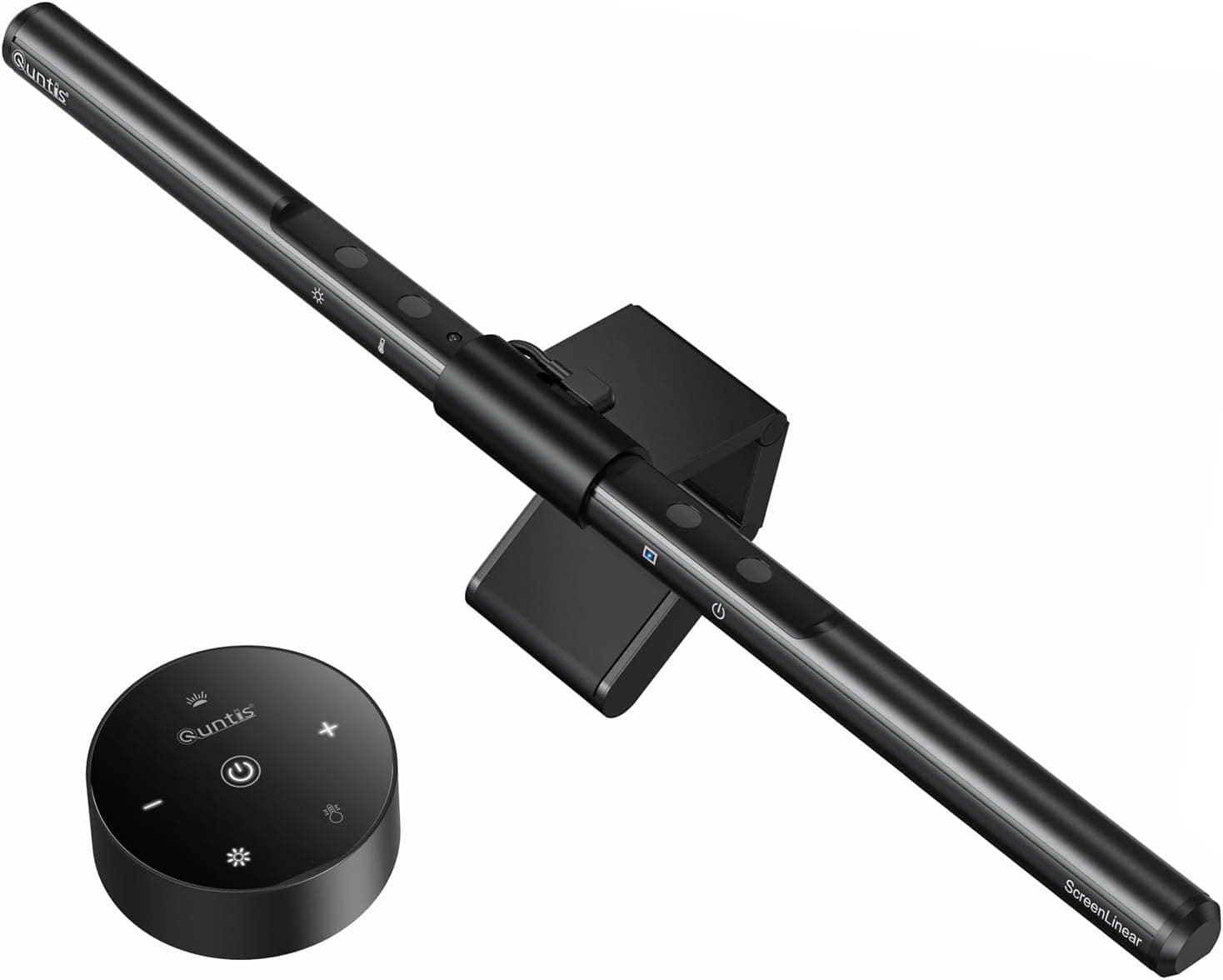
Quntis USB computer monitor light bar with auto-dimming, a screen-top LED task lamp that saves desk space.
Price range: See on Amazon
What we liked
- + Sits on top of the monitor, taking zero desk space
- + Auto-dimming adjusts brightness to room light automatically
- + Asymmetric light bar lights the desk without glare on the screen
Trade-offs
- - Clip may not sit well on very thin or curved monitor bezels
- - USB power needs a free port on the monitor or computer
What it is and who it suits
This is a USB powered LED light bar from Quntis that clips over the top edge of a monitor rather than sitting on the desk like a traditional lamp, so it lights the desk surface and keyboard without taking up any footprint. It suits anyone working at a monitor for long hours who wants to reduce eye strain from overhead lighting or a dark room, especially people who already feel their desk is cramped and do not want to add another lamp base and cord to the clutter. It is less useful for a setup with no monitor to clip onto, such as a pure laptop desk, where a small clamp lamp would make more sense than a monitor-mounted light bar.
Auto-dimming and light quality
The light bar uses a built-in ambient light sensor that continuously reads the surrounding brightness and adjusts its own output to match, so the light gets brighter as a room gets darker and dims back down as daylight increases, rather than needing manual adjustment through the day. Quntis lists a downward-facing, asymmetric light design intended to light the desk directly while avoiding glare that would otherwise reflect off the screen back at the user. Color temperature and brightness are both adjustable through touch controls, with the sensor otherwise handling automatic adjustment once a preferred range is set.
Controls and power
Touch sensitive controls on the bar handle power and manual adjustment, and the light includes a memory function that recalls the previous brightness and color temperature setting after being turned off and back on, so it does not reset to default every time. Some Quntis models in this line include a timer that reminds users to take a break after a couple of hours of continuous use. Power comes from USB, which can be drawn from a computer, phone charger, or power bank, so the light does not need its own wall outlet in most desk setups.
Mounting and monitor fit
The bar clips onto the top edge of a monitor using a spring-loaded clamp design common to this style of light, which works well on standard flat panel monitor bezels of typical thickness. Very thin-bezel monitors, ultrawide curved screens, or unusual panel shapes can be a tighter fit for this style of clip, so checking the bezel thickness against the clip's stated range before buying is worthwhile if the monitor is unusual. Because the light sits above the screen rather than clamping to the desk, it also does not interfere with keyboard or mouse space at all.
Value against desk lamps
Compared with a traditional desk lamp, this light bar's main advantage is desk space, since it uses no footprint and instead reuses space already occupied by the monitor. Auto-dimming and touch controls put it ahead of basic USB desk lamps that only offer a fixed brightness or manual stepped settings, and it is priced in the same range as many standalone LED desk lamps despite doing more. Buyers who specifically want a light that also serves as a room lamp or that can angle away from the monitor entirely may still prefer a traditional adjustable arm lamp instead, since a monitor light bar stays fixed in one position once clipped on and pointed at the desk.
Frequently asked questions
How does the auto-dimming feature work?
A built-in ambient light sensor reads the room's brightness continuously and adjusts the bar's output to match, so it gets brighter in a dark room and dims as daylight increases.
Does it fit curved or very thin monitor bezels?
It clips on with a spring-loaded clamp built for standard flat panel bezels, so very thin or heavily curved screens should be checked against the clip's range before buying.
What powers the light bar?
It runs on USB power, which can come from a computer, phone charger, or power bank, so it does not need its own wall outlet.
Does it remember my brightness setting?
Yes, a memory function recalls the last brightness and color temperature setting after the light is turned off and back on.
Prices change often, so check the current price and availability on Amazon.
Check price on AmazonDesk Upgrade Nest may earn a commission from the link above.