TOBENONE 13-in-1 USB C Docking Station Dual Monitor, Dual HDMI, DP, Audio Review (2026)
Updated September 14, 2026 · Research-based review
Our verdict
The TOBENONE 13-in-1 dock condenses dual HDMI, a DisplayPort output, six USB ports and Ethernet into one USB-C cable for Dell, HP, Lenovo and Asus laptops. It is a solid single-cable upgrade for a dual monitor desk, though actual dual-display support depends on your laptop's USB-C graphics output.
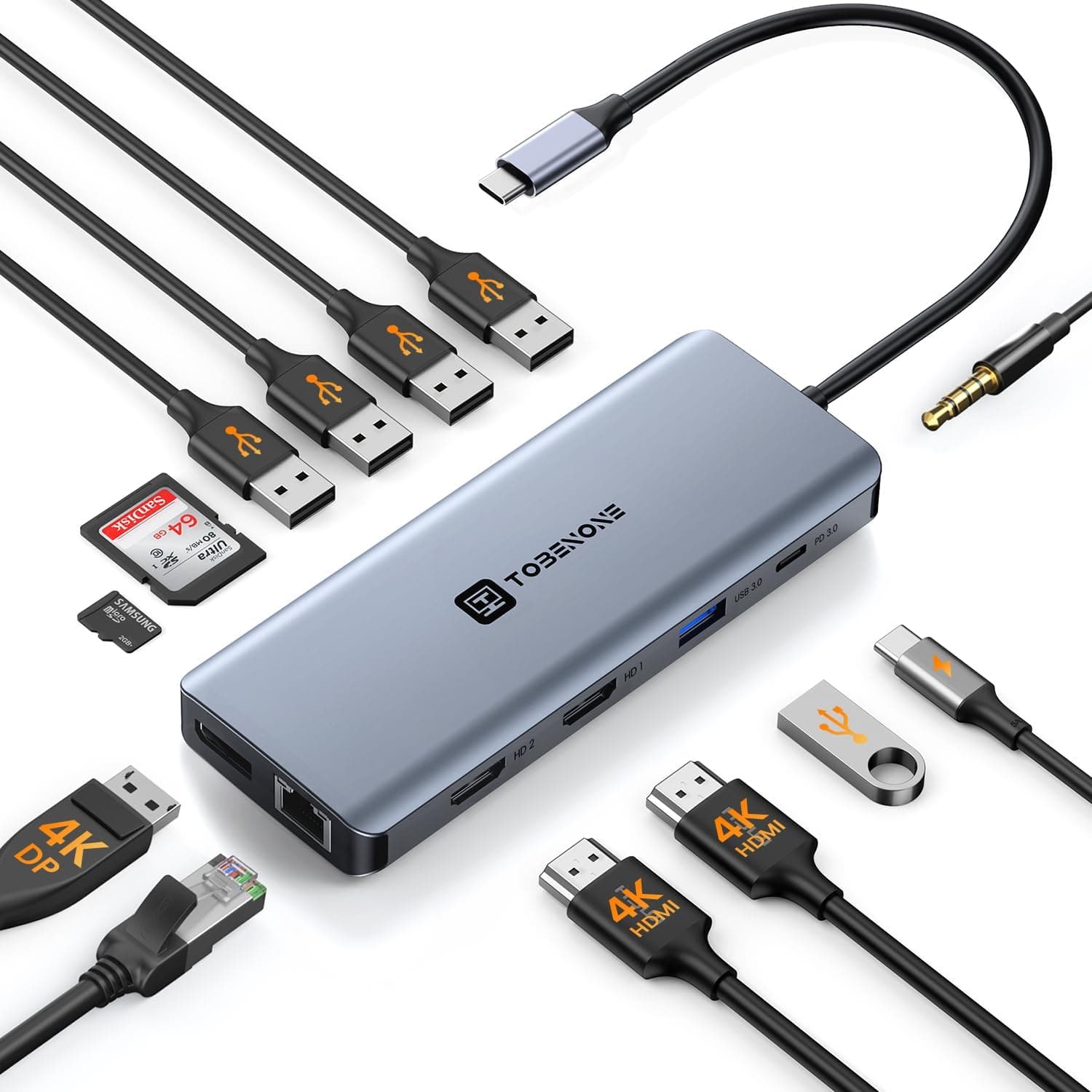
TOBENONE 13-in-1 USB C docking station for dual monitors with dual HDMI, DP and audio ports.
Price range: See on Amazon
What we liked
- + 13-in-1 port count covers displays, USB, audio and more
- + Dual HDMI plus DP gives flexible dual monitor connections
- + Single dock simplifies connecting a laptop at a home desk
Trade-offs
- - Dual monitor extend mode depends on laptop USB-C support
- - TOBENONE is a smaller brand with less firmware support
Who this docking station is for
This dock is built for laptop owners who want to connect two external monitors, wired internet and several USB accessories through one USB-C cable rather than juggling multiple adapters. TOBENONE markets it specifically toward Dell, HP, Lenovo and Asus laptops with a full-function USB-C or Thunderbolt port, which covers most modern Windows business laptops sold for home office work. Anyone with an older laptop that lacks a video-capable USB-C port will not be able to use the display outputs at all, since the dock relies entirely on that single upstream cable to carry both power and video signal from the laptop.
Ports and display support explained
The dock exposes 13 total connections: two HDMI outputs and one DisplayPort output for video, six USB ports split across four USB 3.0 and two USB 2.0 positions, one additional USB-C data port, a USB-C power delivery input, a Gigabit Ethernet jack and a 3.5mm audio and microphone jack. The two HDMI ports and single DisplayPort together allow dual external monitor setups, either mirroring or extending the laptop's own screen, which is the dock's core selling point. Whether both external displays run at their native resolution depends on the laptop's graphics chip and how many independent display streams its USB-C or Thunderbolt port can output, a limitation set by the laptop rather than the dock itself.
Living with it day to day
Setup is plug and play on supported Windows laptops, needing no driver install for the core USB and Ethernet functions, and the single USB-C cable keeps desk cabling far simpler than running separate HDMI, USB and Ethernet leads directly into a laptop. The Gigabit Ethernet port is a genuine benefit for video calls in homes with inconsistent Wi-Fi, and having six USB ports on one dock covers a keyboard, mouse, webcam and external drive without needing a separate hub. Because everything routes through one upstream cable, unplugging and replugging the laptop each day becomes a single-cable action rather than juggling several cords.
Trade-offs and how it compares with other docks
Against the Plugable and StarTech docks that top this guide, the TOBENONE gives up some brand reputation and possibly firmware polish in exchange for a lower price and a broader six-port USB spread. Compared with the Selore 14-in-1 and HODO 15-in-1 docks that rank just above it here, the TOBENONE's port count is a little lower and it lacks VGA support for legacy monitors, which matters only if you still run an older display. As a smaller brand, TOBENONE also offers less firmware and driver support over time than the established dock makers in this guide, which is the main reason it sits mid-pack on build trust despite solid day-to-day function.
Verdict and who should look elsewhere
This dock is a sensible pick for anyone running a Dell, HP, Lenovo or Asus laptop who wants dual monitors, Ethernet and a full set of USB ports through a single cable at a moderate price. Our score of 7.8/10 reflects solid port coverage weighed against a smaller brand's support and no legacy VGA output. Buyers with older monitors needing VGA should look at the HODO dock ranked above it in this guide, and anyone who wants the strongest brand track record should consider the higher-scoring Plugable or StarTech docks instead.
Frequently asked questions
Can this dock run two external monitors at once?
Yes, through its two HDMI ports and one DisplayPort output, though whether both run at full native resolution depends on how many display streams your laptop's USB-C port supports.
Does this dock include an Ethernet port?
Yes, it has a Gigabit Ethernet jack, which is useful for stable video calls in homes where Wi-Fi is not reliable.
How many USB ports does the dock have?
It has six USB ports in total, split across USB 3.0 and USB 2.0 positions, plus an additional USB-C data port.
Does this docking station support VGA monitors?
No, this model does not include a VGA output, so it will not connect to older VGA-only monitors or projectors.
Prices change often, so check the current price and availability on Amazon.
Check price on AmazonDesk Upgrade Nest may earn a commission from the link above.