HODO USB C Docking Station 15-in-1, Dual 4K HDMI + 8K DP + VGA, Ethernet Review (2026)
Updated September 14, 2026 · Research-based review
Our verdict
The HODO 15-in-1 dock is the port-richest option in this roundup, pairing dual 4K HDMI with an 8K-capable DisplayPort, VGA and Ethernet. It suits anyone plugging in older monitors alongside a new high-res display, though the 8K output only matters with the right laptop and cable.
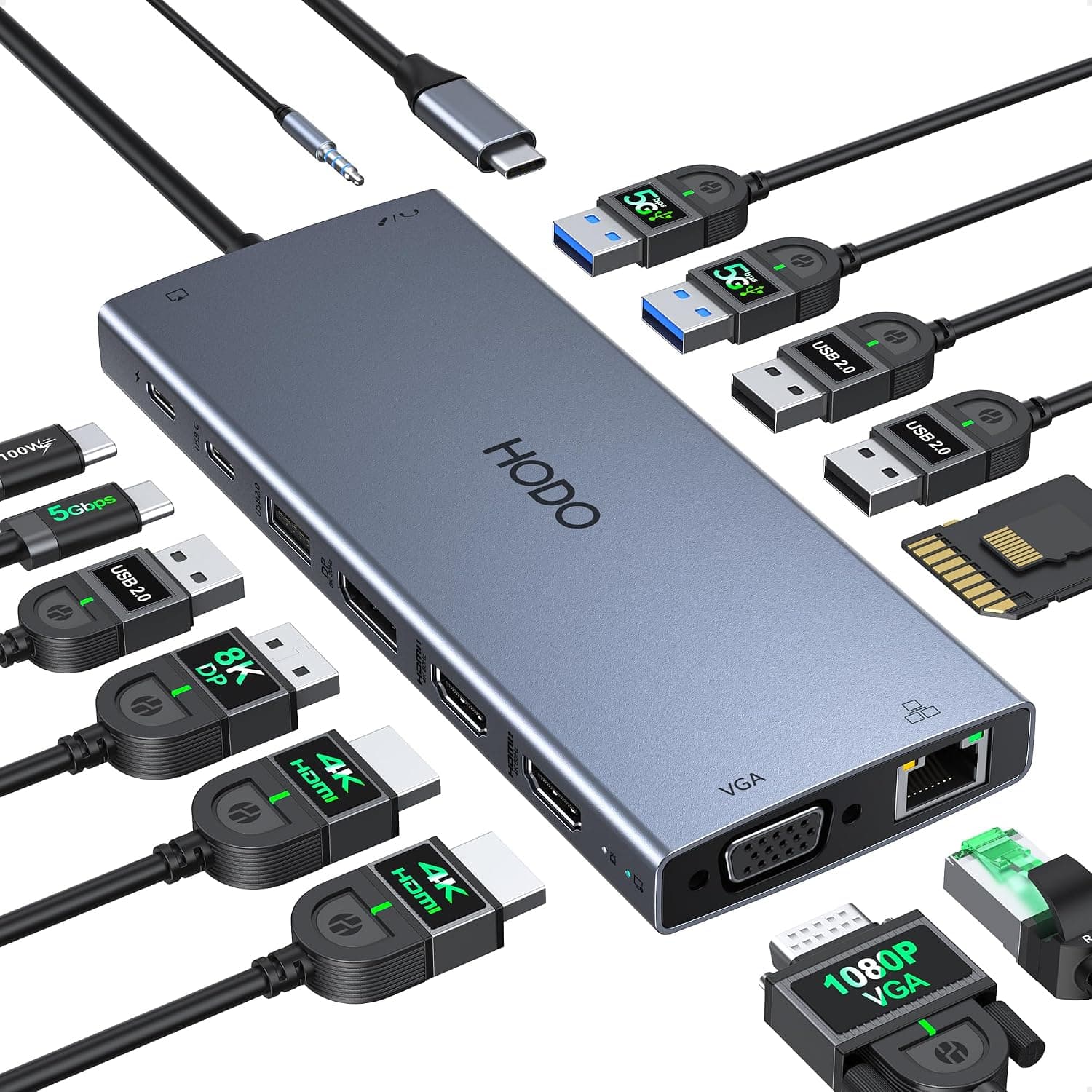
HODO 15-in-1 USB C docking station with dual 4K HDMI, 8K DP, VGA and Ethernet, the most port-rich dock here.
Price range: See on Amazon
What we liked
- + 15-in-1 layout gives the widest range of ports in this group
- + 8K DP output supports high-resolution displays for creative work
- + Dual 4K HDMI plus VGA covers new and legacy monitors
Trade-offs
- - 8K output needs a compatible laptop and cable to work
- - Large dock with many ports can clutter the desk with cables
Who this docking station is built for
This dock targets home office workers who juggle several display types at once, since it is one of the few in this class to combine dual 4K HDMI, an 8K-rated DisplayPort and a VGA output on the same unit. That VGA port matters for anyone still connecting an older projector or monitor that a newer dock would simply drop. The dock is sold with USB-C cabling and is described by the manufacturer as compatible with Dell XPS, Dell Latitude, Lenovo ThinkPad and Yoga models, HP EliteBook and Envy laptops, Surface Pro and MacBook Pro or Air, so it is aimed at a mixed-laptop household or office rather than a single brand. Buyers who only need one external monitor and a couple of USB ports would be better served by a smaller, cheaper hub, but anyone standardizing a desk around several legacy and modern screens gets more headroom here than from most rivals.
Ports and power explained
Behind the 15-in-1 label sits a specific port list: two HDMI outputs rated for 4K at 60Hz, a DisplayPort output rated up to 8K at 30Hz, a VGA output for 1080p displays, two USB 3.0 ports, two USB 2.0 ports, a USB-C 3.0 data port, a 3.5mm audio and mic jack, SD and TF card slots, and a Gigabit Ethernet jack. Power passthrough is rated at 100W over USB-C, which is enough to charge most ultrabooks while the dock is in use. In plain terms, the 8K DisplayPort figure only applies when the connected laptop's USB-C or Thunderbolt port and the DisplayPort cable both support that bandwidth, so most buyers will actually run it at 4K, which the dock also handles cleanly through either the DP or HDMI outputs.
Setting it up and living with it day to day
Installation is plug and play on both Windows and macOS, with no driver download needed for the core video and USB functions, though the manufacturer notes a screen-off button with detection lamps that lets you blank the connected displays without unplugging anything. Because the dock exposes so many ports on one body, cable management becomes the main daily chore. Expect to route HDMI, DisplayPort, Ethernet and USB peripheral cables away from the desk edge so the dock does not become a tangle magnet. The Gigabit Ethernet port is a genuine convenience for video calls in a home office where Wi-Fi is inconsistent, and the SD and TF card slots save reaching for a separate card reader when moving photos or footage off a camera.
Trade-offs and how it stacks up against other docks
Against the Plugable Universal Laptop Docking Station and the StarTech dual monitor dock, both of which score a little higher in this guide, the HODO's advantage is sheer port count and the inclusion of VGA, which those two rivals do not carry. The trade-off is a larger footprint on the desk and a build that this guide rates a step behind those two established brands for materials. Compared with the Selore 14-in-1 dock, a closer rival in port count, the HODO's 8K DisplayPort spec stands out on paper, but in practice most buyers will not have a monitor or cable that pushes past 4K, making that particular spec mostly a bonus for future-proofing rather than a day-one benefit.
Verdict and who should look elsewhere
Choose this dock if your desk mixes newer 4K monitors with an older VGA display or you want Ethernet and card readers built into the same unit, since few competitors at this price bundle all of it together. Skip it if you only run a single external monitor and want the smallest, tidiest hub possible, or if brand-name build quality and long-term firmware support matter more to you than raw port count, in which case the higher-scoring Plugable or StarTech docks in this guide are the safer pick. Our score of 8.1/10 reflects strong features held back slightly by build and desk-clutter concerns.
Frequently asked questions
Does the HODO dock support two 4K monitors at once?
Yes, it can drive two displays through its dual HDMI ports at 4K 60Hz, and a third display is possible using the DisplayPort output as well, depending on your laptop's graphics output limits.
Will the 8K DisplayPort output work with any laptop?
No, the 8K figure needs a laptop USB-C or Thunderbolt port and a DisplayPort cable that both support that bandwidth. Most laptops and cables will run the port at 4K instead, which the dock still handles well.
Does this dock charge my laptop while docked?
It passes through up to 100W of USB-C power delivery, which is enough to charge most ultrabooks during normal use, though you should check your laptop's own charging wattage requirement.
Is the VGA port useful if I only have modern monitors?
The VGA output mainly matters if you still connect an older monitor or projector. If every display you own is HDMI or DisplayPort, you can ignore that port entirely.
Prices change often, so check the current price and availability on Amazon.
Check price on AmazonDesk Upgrade Nest may earn a commission from the link above.