R-Go Ergonomic Split Keyboard, Scissors Mechanism, 2 Part Design, USB-C Wired Review (2026)
Updated September 14, 2026 · Research-based review
Our verdict
A purpose-built ergonomic keyboard for wrist or shoulder strain, letting each half sit at a natural width apart while a light scissor-switch keystroke reduces finger effort. The wired USB-C connection trails wireless rivals on convenience, but its ergonomic focus is more rigorous than most split keyboards aimed at gamers.
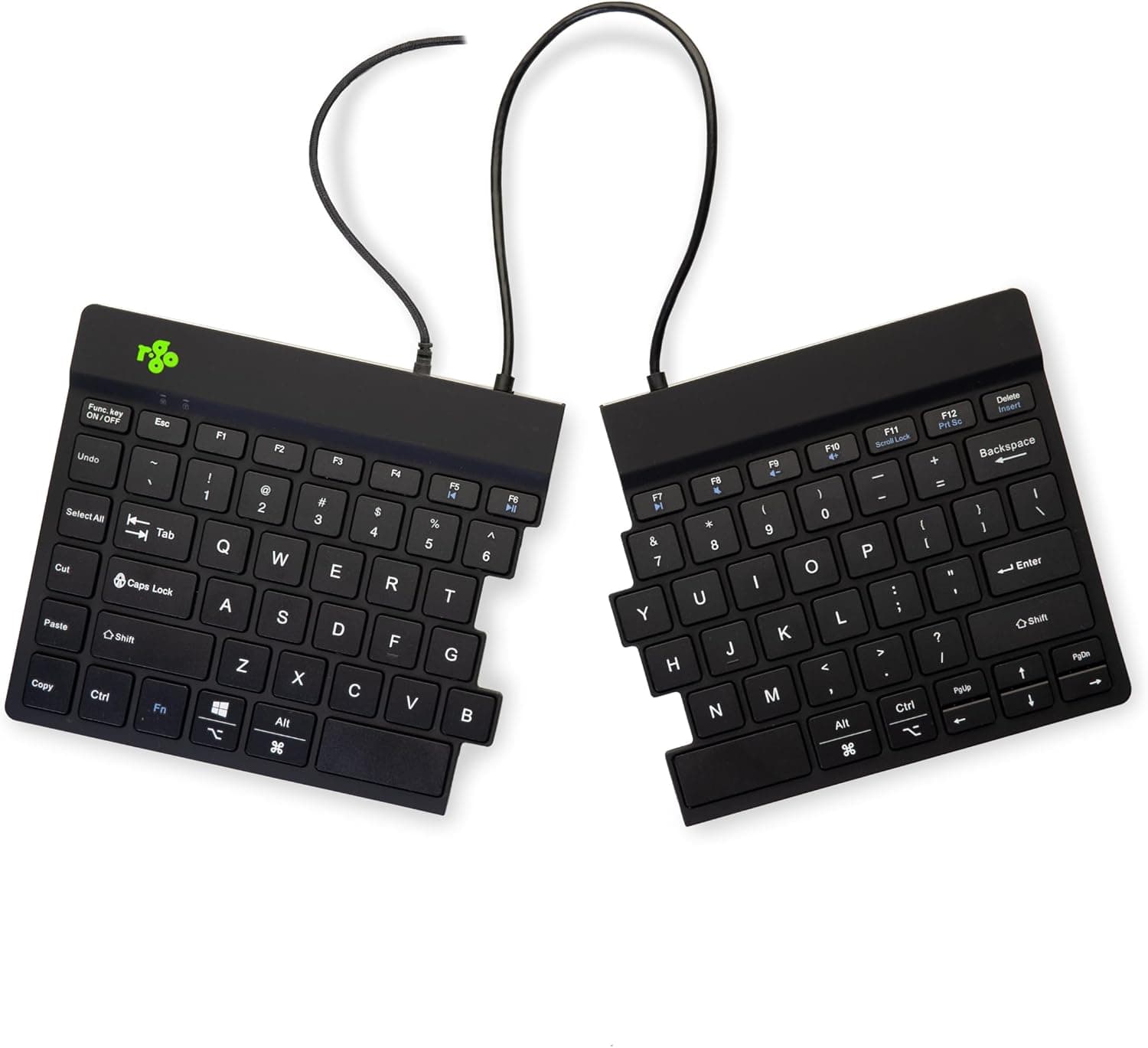
R-Go ergonomic split keyboard with a scissors mechanism, 2 part design and USB-C wired connection.
Price range: See on Amazon
What we liked
- + Scissors mechanism gives a light, low-profile typing feel
- + 2 part design lets each half sit at shoulder width
- + R-Go specializes in ergonomic office peripherals
Trade-offs
- - Wired USB-C connection adds cables to the desk
- - Low-profile keys may feel flat to mechanical keyboard fans
Who this split keyboard is designed for
R-Go Tools builds ergonomic office equipment specifically, and this split keyboard targets people managing wrist, forearm or shoulder discomfort from typing, including early-stage repetitive strain symptoms or diagnosed conditions like carpal tunnel syndrome. Splitting the keyboard into two physically separate halves lets each hand and arm sit at a natural, shoulder-width position instead of being pulled inward by a single fixed keyboard body, which is the core ergonomic idea behind this design. Office workers who type for most of the day and have started noticing tension between the shoulder blades or numbness in the hands are the clearest audience, more so than casual or occasional typists. Anyone already using other ergonomic accessories, like a vertical mouse or an adjustable desk, is a natural fit for this keyboard as the next piece of a broader ergonomic setup.
Scissor mechanism and split design explained
The keys use a scissor-switch mechanism similar to a laptop keyboard, which needs less downward force to register a keystroke than a taller membrane or mechanical switch, reducing finger fatigue over a full workday of typing. The two halves connect to each other with a cable, available in two lengths, so the gap between them can be set anywhere from a modest split up to a wide, shoulder-width separation depending on what feels comfortable. A built-in magnet lets the two halves snap back together into a single compact unit when the split layout is not needed, such as when packing the keyboard for travel. The keyboard connects to a computer over a wired USB-C connection, and R-Go includes its own Break software, which uses LED signals on the keyboard to prompt short rest pauses during long typing sessions.
Living with a split keyboard day to day
Adjusting to a split layout takes some time for anyone coming from a standard keyboard, since finger position and reach change slightly once the two halves are spread apart, though most typists adapt within a week or two of regular use. The ultra-thin, low-profile key height keeps the overall footprint compact on a desk despite the keyboard being split into two pieces, which helps on smaller desks where a wide ergonomic keyboard might otherwise feel unwieldy. The Break software's LED prompts are a distinctive feature compared with most keyboards, giving a physical, on-device reminder to pause typing rather than relying on a separate app or browser extension. Because the connection is wired rather than wireless, there is one less battery to manage, though it does mean an additional cable running to the computer alongside a mouse cable.
Trade-offs against mechanical split keyboards
Our score of 8.4 out of 10 reflects strong ergonomic design, and in its guide it sits behind wireless mechanical split keyboards like the NocFree models, which offer hot-swappable mechanical switches, RGB lighting and wireless connectivity, features aimed more at enthusiasts and gamers than at pure ergonomic use. R-Go's scissor mechanism trades the tactile feedback of a mechanical switch for a lighter, quieter keystroke that is arguably better suited to long office typing sessions rather than gaming. The wired USB-C connection is a step back in convenience compared with the wireless NocFree keyboards in the same comparison, adding a cable to the desk that a wireless model would not need. Anyone who wants RGB lighting or a customizable typing feel with swappable switches will find more of that in the mechanical alternatives in this guide.
Verdict and who should look at a different keyboard
This keyboard is a strong choice for anyone whose main goal is reducing physical strain from typing, since R-Go's specialization in ergonomic office tools shows in details like the Break software and the light scissor mechanism. Buyers who want a mechanical typing feel, wireless connectivity or RGB lighting should look at the NocFree models ranked ahead of it in the same guide instead, since those prioritize enthusiast features over pure ergonomics. Gamers or anyone who spends significant time on fast-paced typing games may also prefer a mechanical switch keyboard's tactile feedback. For office workers focused on comfort and strain reduction above all else, this R-Go keyboard remains a well-targeted pick.
Frequently asked questions
How far apart can the two halves of the keyboard be positioned?
The halves connect with a cable available in two different lengths, so the gap can be set from a modest split up to a wider, shoulder-width separation depending on the cable chosen and desk space.
Does this keyboard work on both Windows and Mac?
It connects over a wired USB-C connection and works with Windows out of the box, while Mac compatibility for full key mapping typically requires the Karabiner-Elements utility according to the product listing.
What does the Break software actually do?
It uses LED signals built into the keyboard to prompt periodic short rest pauses during long typing sessions, aiming to reduce strain from continuous typing without needing a separate app running.
Can the two halves be joined back into one keyboard?
Yes, a built-in magnet allows the two halves to snap together into a single compact unit, which is useful for storage or travel when the split layout is not needed.
Prices change often, so check the current price and availability on Amazon.
Check price on AmazonDesk Upgrade Nest may earn a commission from the link above.