NocFree Wireless Ergonomic Split Mechanical Keyboard - Linear, Hot-Swappable 60% Review (2026)
Updated September 14, 2026 · Research-based review
Our verdict
This split wireless board suits typists who want a compact, low-noise mechanical keyboard without a cable running to each half. Linear switches and hot-swap sockets make it flexible for programmers and writers, but the missing number pad and the lack of Bluetooth are trade-offs worth knowing before buying.
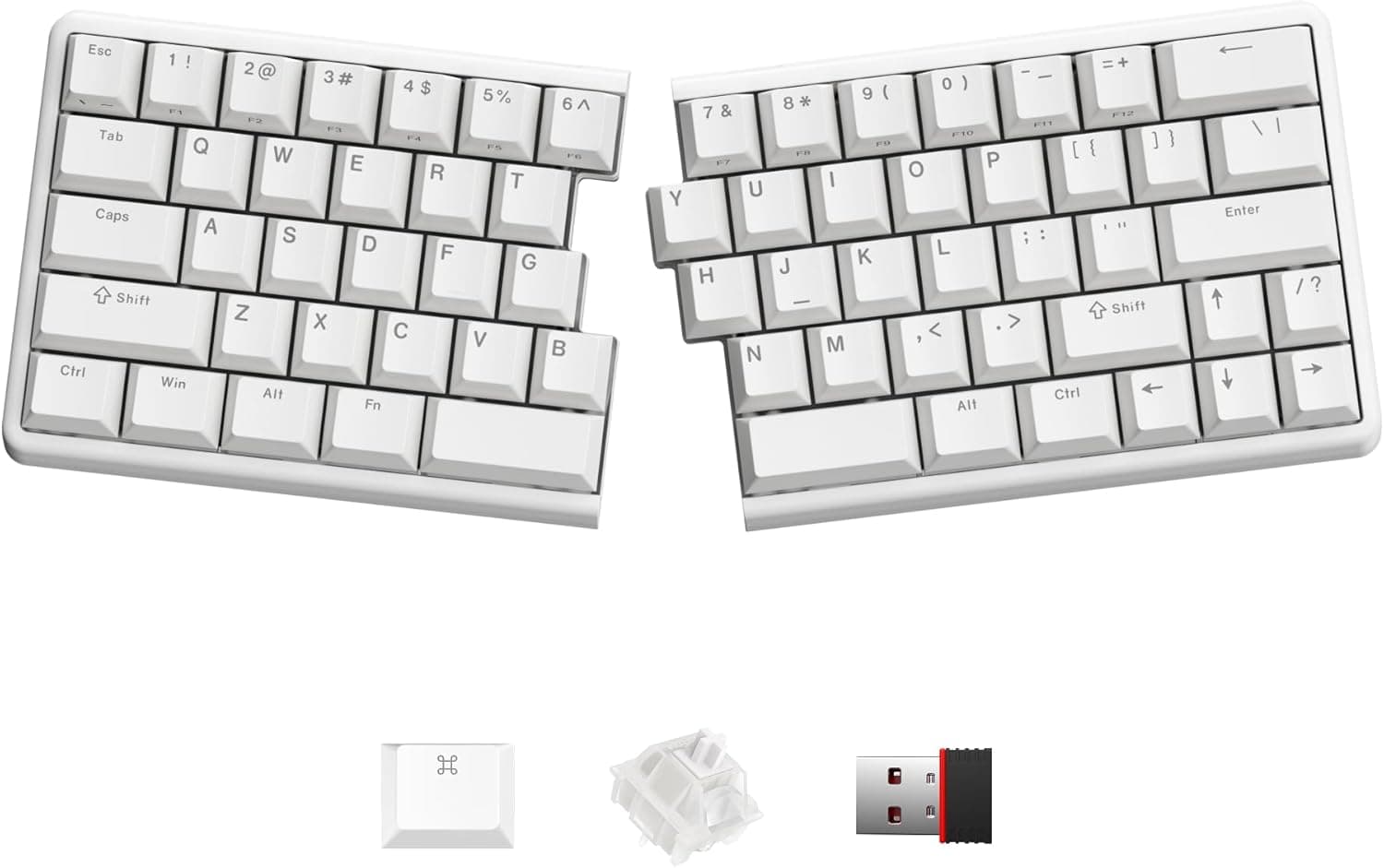
NocFree wireless ergonomic split mechanical keyboard with linear switches and a hot-swappable 60% layout.
Price range: See on Amazon
What we liked
- + Linear switches give a smooth, quiet keystroke with no bump
- + Wireless split halves reduce cable clutter on the desk
- + Hot-swappable board makes future switch upgrades easy
Trade-offs
- - Linear switches can lead to accidental key presses for light typists
- - No number pad in the 60% layout
Who this keyboard is for
This board is aimed at people who type for long stretches, whether that is coding, writing or general office work, and who want their hands and shoulders in a more natural position than a standard flat keyboard allows. The split halves let each hand sit at its own width and angle, and the compact layout removes the number pad and most of the function row to keep the desk footprint small. It suits programmers, writers and anyone already comfortable with a mechanical keyboard who wants to try a split ergonomic layout without committing to a large, expensive kit. It is a poor match for accountants or anyone who relies on a numeric keypad daily, since there is no integrated number pad on either half.
Layout, switches and connectivity explained
The keyboard uses a compact split layout, listed by the retailer as a 60 percent style board, so it drops the number pad and dedicated arrow cluster to stay small on the desk. Linear switches are fitted, meaning each keypress moves straight down with no tactile bump partway through, which gives a smooth, quiet feel favored by fast typists, though light typists can bottom out keys accidentally since there is no bump to signal a registered press. The board is hot-swappable, so the switches can be pulled and replaced without soldering if you want to try tactile or clicky switches later. Connection is wireless over a 2.4GHz USB dongle rather than Bluetooth, with a wired USB-C mode also available, and PBT keycaps are included for a keyboard shorter-wearing legends and finish.
Setting it up and using it day to day
Setup means pairing the 2.4GHz dongle once and placing each half of the keyboard where it feels natural, with a tenting angle already built in to keep the wrists from rolling inward. Day to day, the wireless split design removes a cable running between the halves, which is one of the more common annoyances with other split keyboards, and the board can be reprogrammed through a web-based configuration tool without installing extra software. Battery life is rated at several months between charges depending on how the RGB and backlight settings are used, and the halves charge over USB-C. Because there is no number pad and a reduced function row, switching from a full-size keyboard takes an adjustment period, and it is worth practicing before relying on it for spreadsheet-heavy work.
Trade-offs and how it compares
The two clearest trade-offs are the missing number pad, which anyone doing regular numeric entry will notice, and the linear switch feel, which some typists find leads to more accidental presses than a tactile switch gives. Compared with the tactile version of this same NocFree board, the linear model trades the clear keypress bump for a smoother, quieter stroke, so the choice between them comes down to typing feel rather than build quality. Compared with the KINESIS Freestyle2, a wired scissor-switch split keyboard with a roughly 9 inch separation, this NocFree board offers full mechanical switches and a wireless connection, at the cost of the Freestyle2's simpler, cheaper design and long track record in office settings. Anyone who needs the widest possible hand separation should compare both before choosing.
Verdict and who should pick something else
For typists who want a genuinely wireless split mechanical keyboard with hot-swappable switches and a small desk footprint, this is a well-featured option at our score of 8.6 out of 10, driven mainly by its feature set and fit for ergonomic typing. Anyone who needs a number pad, prefers Bluetooth over a USB dongle, or wants a tactile bump on every keypress should look at a different layout or the tactile version of this same keyboard line. It is also not the right pick for someone who is not yet sure they like split keyboards, since the compact layout adds a learning curve on top of the split adjustment.
Frequently asked questions
Does this keyboard have a number pad?
No, it uses a compact split layout without a dedicated number pad or full function row, so anyone who relies on numeric entry should plan for an external number pad.
Can the switches be swapped out later?
Yes, the board is hot-swappable, so switches can be pulled and replaced without soldering if you want a different feel down the line.
Does it connect over Bluetooth?
No, it pairs over a 2.4GHz USB wireless dongle, with a wired USB-C connection also available, but there is no Bluetooth mode.
How long does the battery last between charges?
Battery life runs several months per charge depending on lighting settings, since each split half has its own rechargeable battery.
Prices change often, so check the current price and availability on Amazon.
Check price on AmazonDesk Upgrade Nest may earn a commission from the link above.