KINESIS Freestyle2 Ergonomic Keyboard for PC (9" Separation) Review (2026)
Updated September 14, 2026 · Research-based review
Our verdict
The Kinesis Freestyle2 splits into two halves that separate up to 9 inches apart, letting hands and shoulders sit in a more natural position while keeping a familiar Windows key layout. It is a strong pick for PC users easing into split keyboards, though Mac users and tenting fans need extras.
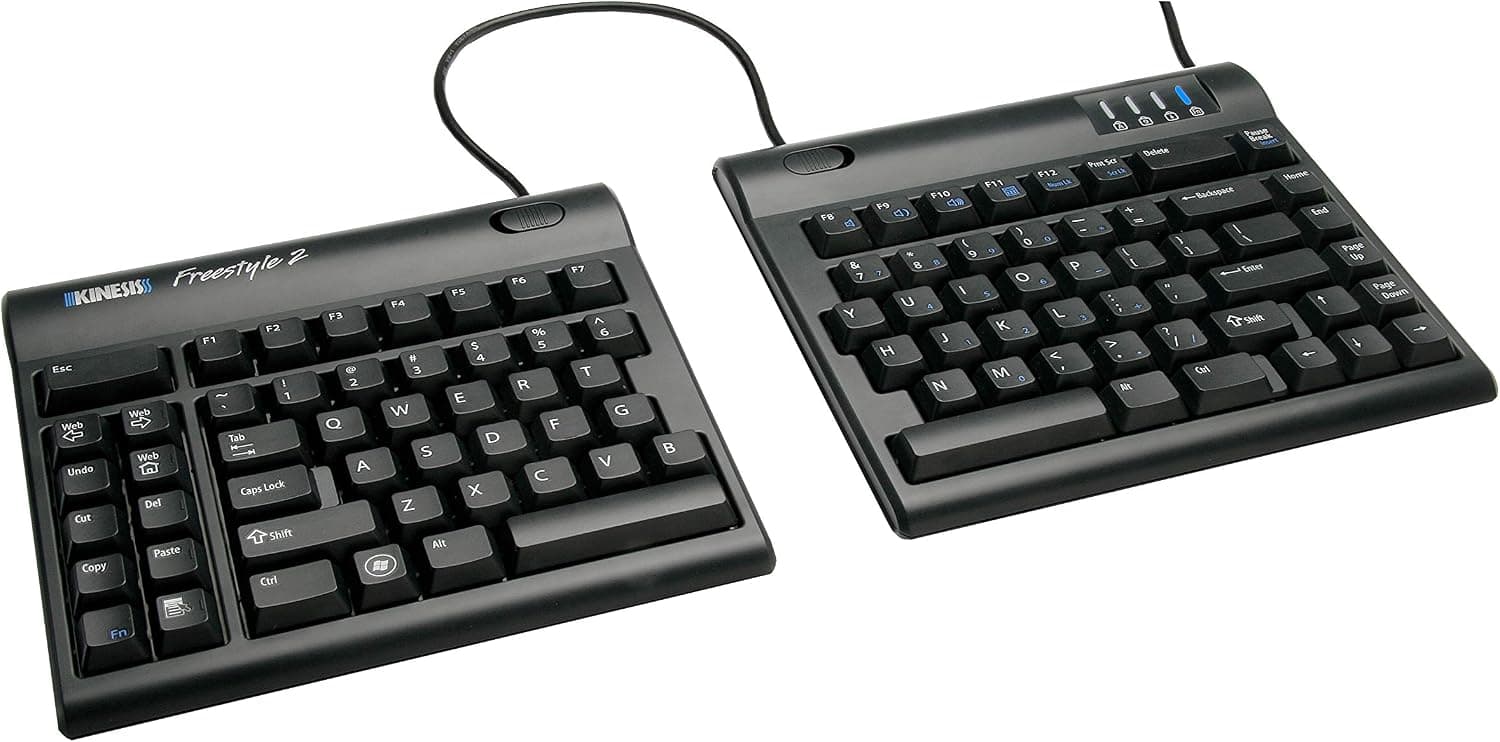
KINESIS Freestyle2 ergonomic keyboard for PC with 9" separation, a well-known split board from an ergonomics pioneer.
Price range: See on Amazon
What we liked
- + 9" separation lets hands and shoulders sit wider apart
- + KINESIS has decades of experience designing ergonomic keyboards
- + Familiar key layout makes switching from a standard board easier
Trade-offs
- - PC-specific version is not ideal for Mac shortcut layouts
- - Flat by default, so tenting accessories cost extra
Who this split keyboard is for
This keyboard is built for PC users who want the ergonomic benefit of a split design without relearning an unfamiliar key layout, since it keeps a standard Windows arrangement with Cut, Copy and Paste hotkeys, multimedia keys and an embedded 10-key numeric pad. Kinesis has designed ergonomic keyboards for decades, and the Freestyle2 is its entry-level split model aimed at office workers and anyone managing early wrist or shoulder discomfort from a traditional flat keyboard. Because this specific version is built for PC, Mac users who rely on Command-key shortcuts will find the layout mismatched, and Kinesis sells a separate Mac edition for that audience instead.
Specs and design explained
The two halves connect by a cable and can separate anywhere from a joined position up to 9 inches apart in this configuration, letting each hand sit at a width that matches shoulder posture rather than the fixed width of a one-piece board. Kinesis rates the width range from 15.4 inches minimum to 23.5 inches maximum across the split, with each half 7.1 inches deep and 0.9 inches tall, and the whole unit weighs about 2 pounds. It connects over USB with a 6 foot cable, needs no software or drivers to function, and uses a quiet, low-force tactile membrane switch rated at roughly 45 grams of actuation force, which Kinesis states is at least 25 percent lighter than most traditional keyboards.
Living with a split keyboard day to day
Out of the box the Freestyle2 sits flat with a zero degree slope, which Kinesis designed specifically to reduce wrist extension compared with keyboards that angle upward toward the back. That flat default is comfortable for many typists immediately, but anyone who wants positive or negative tilt, known as tenting, needs to add Kinesis's separate V3 lifter accessory sold on its own. Day to day, the low actuation force and quiet membrane switches make this a comfortable keyboard for long typing sessions in shared offices or open-plan homes, and the embedded numeric pad means spreadsheet-heavy work does not require a separate number pad taking up desk space.
Trade-offs and how it compares with other split keyboards
Against the NocFree wireless mechanical split keyboards, all three of which score a bit higher in this guide, the Freestyle2 trades mechanical hot-swappable switches and wireless freedom for a proven, simple membrane design and a wired connection that never needs charging or pairing. Compared with the R-Go split keyboard, which scores similarly, the Freestyle2's 9 inch separation range and long design history give it an edge in track record, while R-Go's scissor mechanism offers a different typing feel some users prefer. Buyers wanting mechanical switches and full wireless freedom should look at the NocFree options; buyers who want a dependable wired board with decades of ergonomic design behind it get that here.
Verdict and who should look elsewhere
This keyboard earns its place for PC users who want proven split ergonomics, a familiar key layout and quiet low-force typing without paying for mechanical switches they may not need. Our score of 8.4/10 reflects strong fit for the ergonomic job, balanced against the extra cost of tenting accessories and the flat-only default angle. Mac-first users should look at the Mac edition of this keyboard instead of this PC version, and anyone set on mechanical, hot-swappable switches or wireless connectivity should consider the NocFree models ranked above it in this guide.
Frequently asked questions
How far apart can the two halves of this keyboard separate?
This 9 inch separation version allows the halves to spread from a joined position up to 9 inches apart, with the overall width ranging from about 15.4 to 23.5 inches.
Does this keyboard tent or angle upward?
Not by default. It sits flat with a zero degree slope out of the box, and Kinesis sells a separate V3 lifter accessory if you want adjustable tenting angles.
Is this version compatible with Mac computers?
This listing is the PC layout version built around Windows shortcuts. Kinesis sells a separate Mac-specific edition for Command-key layouts.
Does the keyboard need special software to work?
No, it connects over a standard wired USB connection and needs no software or drivers, working as a standard plug and play keyboard.
Prices change often, so check the current price and availability on Amazon.
Check price on AmazonDesk Upgrade Nest may earn a commission from the link above.