Mount-It! Laptop Desk Mount with Monitor Arm, Dual Stand, Ventilated Tray Review (2026)
Updated September 21, 2026 · Research-based review
Our verdict
Good for anyone running a laptop next to an external monitor who wants both at matching eye level without buying two separate stands. The ventilated tray and dual clamp arms free up desk space, but the clamp needs a deep, sturdy desk edge to stay secure.
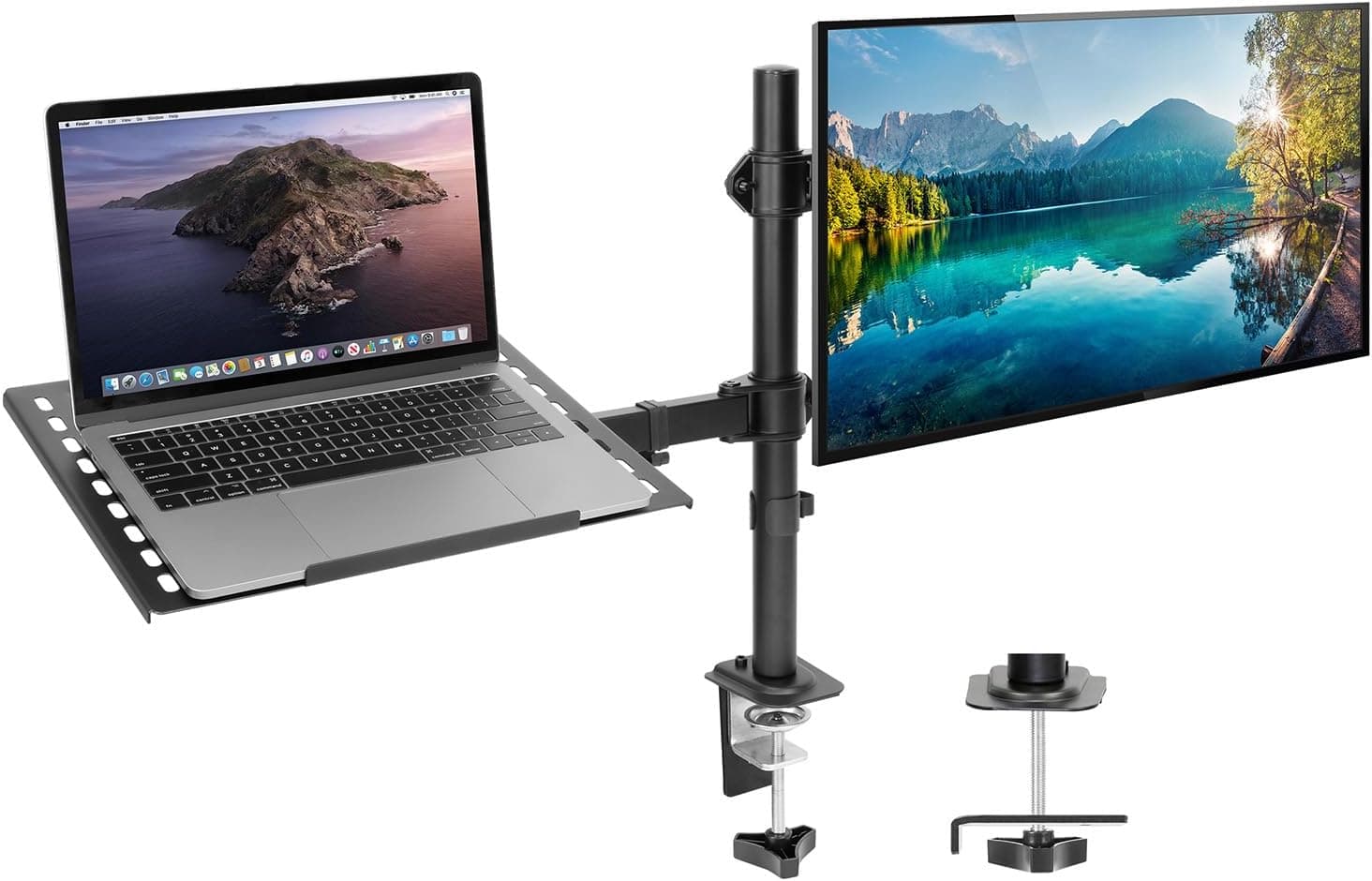
Mount-It! dual laptop desk mount with a monitor arm and ventilated tray, for laptop plus monitor workflows.
Price range: See on Amazon
What we liked
- + Ventilated tray lets heat escape from the laptop underside
- + Dual stand supports a laptop and monitor at matching heights
- + Clamp mounting frees space compared with separate stands
Trade-offs
- - 22 lb arm rating may be tight for large or ultrawide monitors
- - Dual arm needs a deep, sturdy desk edge for the clamp
What it is and who it suits
This is a dual arm desk mount from Mount-It that carries a laptop on a vented tray next to a VESA monitor arm, so both screens sit at the same height instead of the laptop staying flat on the desk. The Amazon listing for this exact model lists it as fitting laptops up to 17 inches together with monitors in the 13 to 32 inch range, which covers most home office laptops and a large single display. It suits people who plug in a monitor daily and want the laptop screen usable too, for a second window, a video call view, or just backup if the external display gets unplugged. Anyone happy leaving the laptop closed under the desk does not need this.
Ventilated tray and heat
The laptop tray on this mount is vented rather than solid, which is the detail that separates it from cheaper flat laptop shelves. A closed tray traps the warm air a laptop pushes out of its underside and side vents, and over a long work day that heat has nowhere to go, so fan noise and thermal throttling both increase. Letting air pass under the laptop keeps intake vents clearer, which matters most for laptops that draw their cooling air from the bottom panel. The tray measures roughly 14 by 11.8 inches, enough for most 13 to 17 inch laptops to sit flat with the lid open at typing height next to the monitor.
Monitor arm and adjustment
The monitor side uses a VESA 75x75 or 100x100 mounting plate, matching the hole pattern on the back of the vast majority of desktop monitors sold today, so no adapter bracket is needed for a standard screen. The arm swivels through 360 degrees and moves independently of the laptop tray, so the monitor can be angled toward or away from the user without disturbing the laptop position. Full motion articulation means both height and depth adjust after mounting, which helps line up mismatched screen heights between a laptop and monitor of different sizes. Weight capacity is rated at 22 pounds per arm, enough for typical 24 to 27 inch office monitors.
Mounting and desk requirements
Mount-It includes both a C-clamp and a grommet base with this mount, so it works on a solid desk edge or through a pre-drilled cable grommet hole, whichever the desk has. A clamp mount needs a desk edge that is not too thick and sturdy enough to resist the leverage of two loaded arms, so a flimsy particleboard desk or one with a very deep edge lip can be a poor match. Because the mount mixes the laptop tray with a heavier full motion monitor arm, checking the manufacturer's clamp depth and thickness limits before buying matters more here than it would for a single lightweight monitor arm.
Value for a mixed laptop and monitor setup
At its price point, this mount replaces what would otherwise be a separate laptop stand and a separate monitor arm, and it frees desk surface area that two standalone stands would use. The tradeoff is that a dual arm mount is more to install and adjust correctly than a single monitor arm, and the laptop side has no locking hinge, so the tray height is fixed once positioned rather than tilting with the lid. For a desk that already has a monitor arm and just needs a laptop shelf bolted alongside it, this is a reasonable one-purchase solution rather than buying two separate mounting products.
Frequently asked questions
What size laptops and monitors does this mount fit?
The listing covers laptops up to 17 inches on the vented tray and monitors from 13 to 32 inches on the VESA arm, using a 75x75 or 100x100 mounting pattern.
Does it need a specific type of desk?
It ships with both a C-clamp and a grommet base, so it works on a solid desk edge or through a grommet hole, but the desk edge needs to be sturdy enough for a clamp mount.
How much weight can the monitor arm hold?
Mount-It rates the arm at 22 pounds, which covers most 24 to 27 inch office monitors.
Does the vented tray tilt with the laptop lid?
The tray sets the laptop at a fixed height and angle once positioned; it does not have a separate lid-tilt hinge like some dedicated laptop arms.
Prices change often, so check the current price and availability on Amazon.
Check price on AmazonDesk Upgrade Nest may earn a commission from the link above.