VIVO Large Keyboard Tray Under Desk Pull Out with Pencil Drawer, C Clamp (MOUNT-KB05-4D) Review (2026)
Updated September 14, 2026 · Research-based review
Our verdict
A no-drill keyboard tray for anyone short on desk space, with a large enough platform for a full keyboard and mouse plus a slide-out pencil drawer for small supplies. The C-clamp mount avoids damaging the desk but needs clearance for the clamp posts, and the tray can crowd chair arms once pushed fully back in.
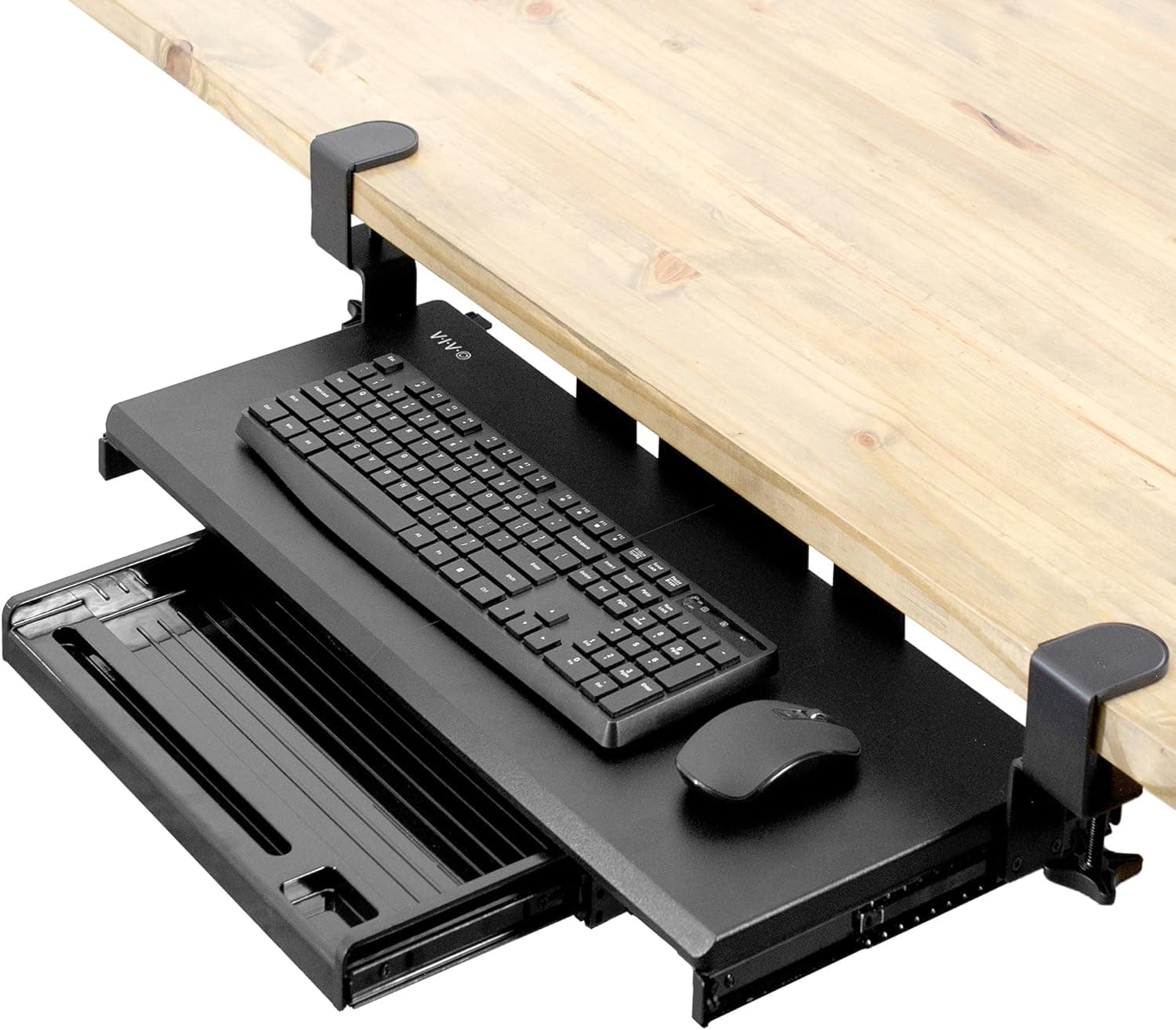
VIVO large C clamp pull out keyboard tray with pencil drawer, model MOUNT-KB05-4D, for extra keyboard and mouse room.
Price range: See on Amazon
What we liked
- + Large tray fits a full-size keyboard and mouse together
- + Pencil drawer keeps small stationery close to your hands
- + C clamp installation avoids drilling into the desk
Trade-offs
- - Large tray may clash with chair arms when pushed in
- - Clamp posts must avoid the desk frame and crossbars
Who should add this keyboard tray
This VIVO tray is built for anyone whose keyboard and mouse currently eat up all the usable desktop space, leaving no room for papers, a laptop or a monitor stand riser. Pulling the keyboard and mouse down onto a dedicated tray frees the full desk surface above it, which particularly helps smaller desks or corner setups where every inch matters. The C-clamp mounting system is aimed at renters and anyone who does not want to drill into a desk, since it grips the edge of the desktop instead of requiring screws into the surface. Anyone who also wants a place for pens, sticky notes or a notepad within reach will appreciate the built-in pencil drawer, which is a less common feature on basic keyboard trays.
Tray size, drawer and mounting explained
The keyboard platform measures about 26.8 inches wide by 11 inches deep, extending to roughly 32.5 inches including the clamp hardware, which is large enough for a full-size keyboard with a separate mouse pad area beside it. Below the main platform sits a slide-out pencil drawer measuring about 17 by 11.5 by 1.9 inches, shallow enough for pens, sticky notes and small desk items without adding much bulk under the tray. The whole assembly slides out roughly 8.5 inches from the desk on its own, or about 18.5 inches when the pencil drawer is also pulled out. Mounting uses sturdy C-clamps rather than screws, rated for desks between about half an inch and one and a quarter inches thick, and the tray carries a weight capacity of about 11 pounds.
Installing and using it day to day
Installation involves clamping the mounting arm to the underside of the desk edge and tightening the C-clamp screws by hand, a job that typically takes well under an hour without any drilling or permanent modification to the desk. Once mounted, sliding the tray in and out uses a steel track system designed for smooth gliding motion, so daily use is a simple pull-and-push action rather than anything that needs adjustment over time. Anti-skid padding on the tray surface keeps the keyboard and mouse from sliding around during use, which matters more on a tray that moves in and out multiple times a day than it would on a fixed desktop. The pencil drawer slides independently, so it can stay open for quick access to pens without needing the keyboard tray extended at the same time.
Trade-offs to know before buying
Our score of 8.0 out of 10 reflects a genuinely useful, well-built tray held back slightly by fit issues that depend on the rest of the desk setup. Because the tray and its clamps extend below and behind the desk edge, chairs with wide armrests can sometimes bump into the tray when it is pushed fully back in, so measuring chair arm height and clearance beforehand avoids a frustrating surprise. The clamp posts also need to land somewhere that avoids the desk's internal frame or crossbars, which is worth checking on desks with a lot of underside hardware, like L-shaped or adjustable-height desks. Compared with the Bambloom monitor stand riser in the same under-monitor storage guide, this VIVO tray adds a keyboard and mouse tray rather than a raised monitor shelf, so the two solve related but different space problems.
Verdict and who might need a different setup
For anyone who wants a full-size keyboard and mouse off the main desktop without drilling into the desk, this VIVO tray is a well-built option with a useful pencil drawer that few competitors include at this size. Buyers with desks under half an inch or over one and a quarter inches thick should double check clamp compatibility before ordering, since the C-clamp range is specific. Anyone whose chair has wide armrests should measure clearance first, and anyone who wants extra storage rather than a keyboard tray specifically may prefer the Bambloom monitor stand riser from the same guide instead, since it prioritizes drawer storage under a raised monitor shelf.
Frequently asked questions
Does installing this tray require drilling into the desk?
No, it mounts using C-clamps that grip the underside of the desk edge, so no drilling or permanent modification to the desk is needed.
What desk thicknesses does the clamp fit?
The manufacturer lists a recommended desk thickness range of about half an inch to one and a quarter inches for the C-clamp mounting system.
How much weight can the tray hold?
The tray has a listed weight capacity of about 11 pounds, which covers a standard keyboard and mouse with some margin for a wrist rest or small accessories.
Can the pencil drawer be opened without pulling out the keyboard tray?
Yes, the pencil drawer slides on its own track separate from the main keyboard platform, so it can be opened for quick access without extending the whole tray.
Prices change often, so check the current price and availability on Amazon.
Check price on AmazonDesk Upgrade Nest may earn a commission from the link above.