Poly Studio P5 Professional Webcam (Plantronics) 1080p HD Review (2026)
Updated September 14, 2026 · Research-based review
Our verdict
Built by Poly, the video conferencing brand under HP, this 1080p webcam targets professionals who spend hours on Zoom or Teams calls and want business-grade reliability over consumer extras. Certified for both platforms with autofocus and a manual privacy shutter, matching our score of 8.4 out of 10.
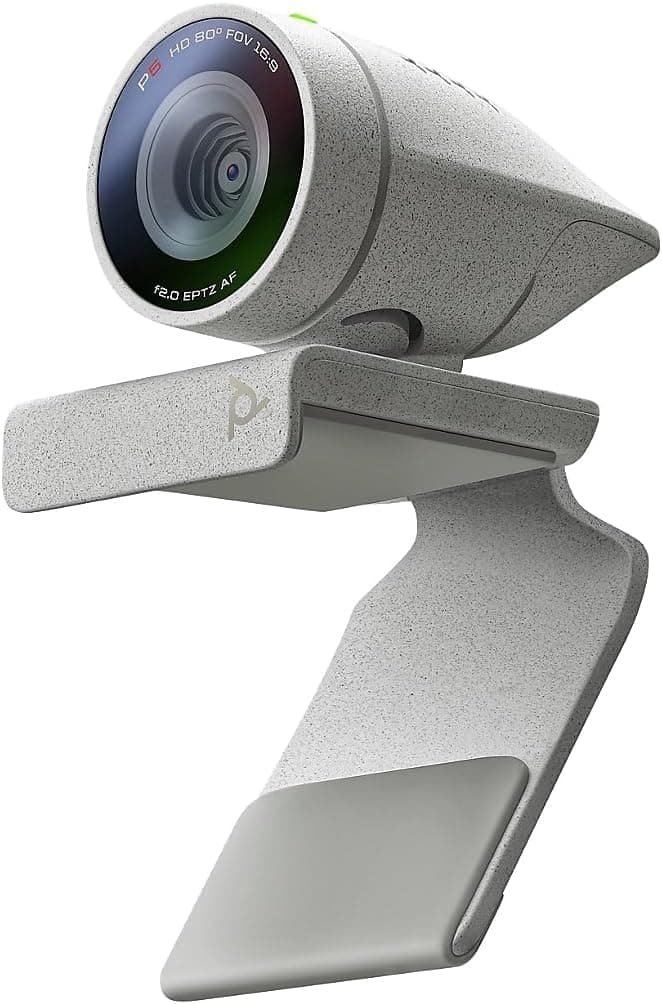
Poly Studio P5 professional 1080p HD webcam from Plantronics, a business-focused camera for video meetings.
Price range: See on Amazon
What we liked
- + Poly Studio P5 is designed for professional video conferencing
- + 1080p HD resolution looks sharp on Zoom and Teams calls
- + Plantronics heritage brings strong business support and compatibility
Trade-offs
- - Professional pricing is higher than consumer 1080p webcams
- - Fixed-focus features may be less flexible than autofocus models
Who the Poly Studio P5 is for
The P5 is aimed squarely at people whose video calls are part of their job, not an occasional chat with family, which is why Poly built it with Microsoft Teams and Zoom certification rather than treating platform compatibility as an afterthought. Remote and hybrid employees who need a webcam that IT departments trust, small business owners who present to clients regularly, and anyone upgrading from a laptop's built-in camera for a more professional look on calls are the core audience. Because it comes from Poly, the video and audio brand under HP that also makes conference room hardware, it fits well into a home office setup that already leans on business tools rather than consumer streaming gear. Casual users who mainly want a camera for occasional video chats may find the professional focus, and the pricing that comes with it, more than they need.
Resolution, field of view and audio explained
The P5 captures Full HD 1080p video with autofocus and 4x zoom, and an 80-degree diagonal field of view that is wide enough to keep a single person framed at a desk without capturing an entire room. Poly pairs the camera with a single directional microphone tuned for personal workspaces, with a frequency response spanning 50 Hz to 16 kHz, aimed at picking up a speaker's voice clearly while reducing background pickup compared with a laptop's built-in mic. A built-in USB-A cable connects to the computer, and a pass-through USB port on the back of the camera lets a Bluetooth headset dongle or speakerphone plug in without giving up a port on the laptop itself, a detail aimed at people who already use other audio gear at their desk.
Setup, mounting and daily use
The P5 is designed to clip onto a monitor for a natural eye-level angle, and it is also compatible with a standard tripod mount for anyone who wants to position it away from the screen. Setup on Windows or Mac is straightforward for basic use, with the Teams and Zoom certification meaning the camera is recognized correctly without extra configuration on the two platforms most business users rely on. A manual privacy shutter physically covers the lens when the camera is not in use, which some owners prefer over a software toggle since it is a visible, tactile confirmation that the camera is blocked. Because the design is compact, at roughly 2.4 by 1.5 by 1.3 inches and about 2.4 ounces without the monitor clamp, it does not add much bulk to a desk or laptop lid.
Trade-offs and how it compares with rivals
The clearest trade-off is cost: this is a business-grade webcam, and Poly prices it above consumer 1080p cameras like the Logitech Brio 101, which our data also ranks well for streaming and meetings at a lower price point. The P5 also uses a fixed set of features tuned for professional video calls rather than the wider zoom ranges or ring-light extras found on cameras built for streaming, so creators chasing webcam-as-content-camera features may find it narrower in scope. Compared with generic 1080p webcams with tripod stands and built-in microphones, the P5's advantage is Poly's business support and certification rather than a dramatically different resolution, since 1080p autofocus is common across this price range now.
Verdict and who should pick something else
The Poly Studio P5 earns its score of 8.4 out of 10 as a dependable, business-focused webcam for anyone whose calls are a daily part of their work and who values Teams and Zoom certification plus Poly's support behind the camera. Buyers on a tighter budget, or anyone who just needs a decent camera for occasional calls, should consider a cheaper 1080p webcam like the Logitech Brio 101 instead, since the P5's price reflects its business positioning rather than a resolution or feature jump most casual users would notice. It is the stronger pick when reliability and professional polish on calls matter more than saving money upfront.
Frequently asked questions
Does the Poly Studio P5 work with both Zoom and Microsoft Teams?
Yes, Poly certifies the P5 for both Zoom and Microsoft Teams, so it is recognized and configured correctly on either platform without extra setup.
Does it have a physical privacy cover?
Yes, it includes a manual privacy shutter that physically blocks the lens, rather than relying only on a software toggle.
Can I mount it on a tripod instead of a monitor?
Yes, the camera supports both a monitor clip mount and tripod mounting, so it can sit away from the screen if needed.
Does the built-in microphone replace a separate headset?
It includes a single directional microphone tuned for personal workspace use, which covers everyday calls, though anyone in a noisy space may still prefer a dedicated headset.
Prices change often, so check the current price and availability on Amazon.
Check price on AmazonDesk Upgrade Nest may earn a commission from the link above.