Microsoft Designer Compact Keyboard - Matte Black, Wireless Bluetooth Review (2026)
Updated September 14, 2026 · Research-based review
Our verdict
The Microsoft Designer Compact Keyboard fits anyone who wants a minimalist Bluetooth keyboard for a laptop or desktop setup with a mouse close by. It pairs with three devices and switches between them, but skips backlighting and a number pad, so heavy spreadsheet users and dim-room typists should look elsewhere.
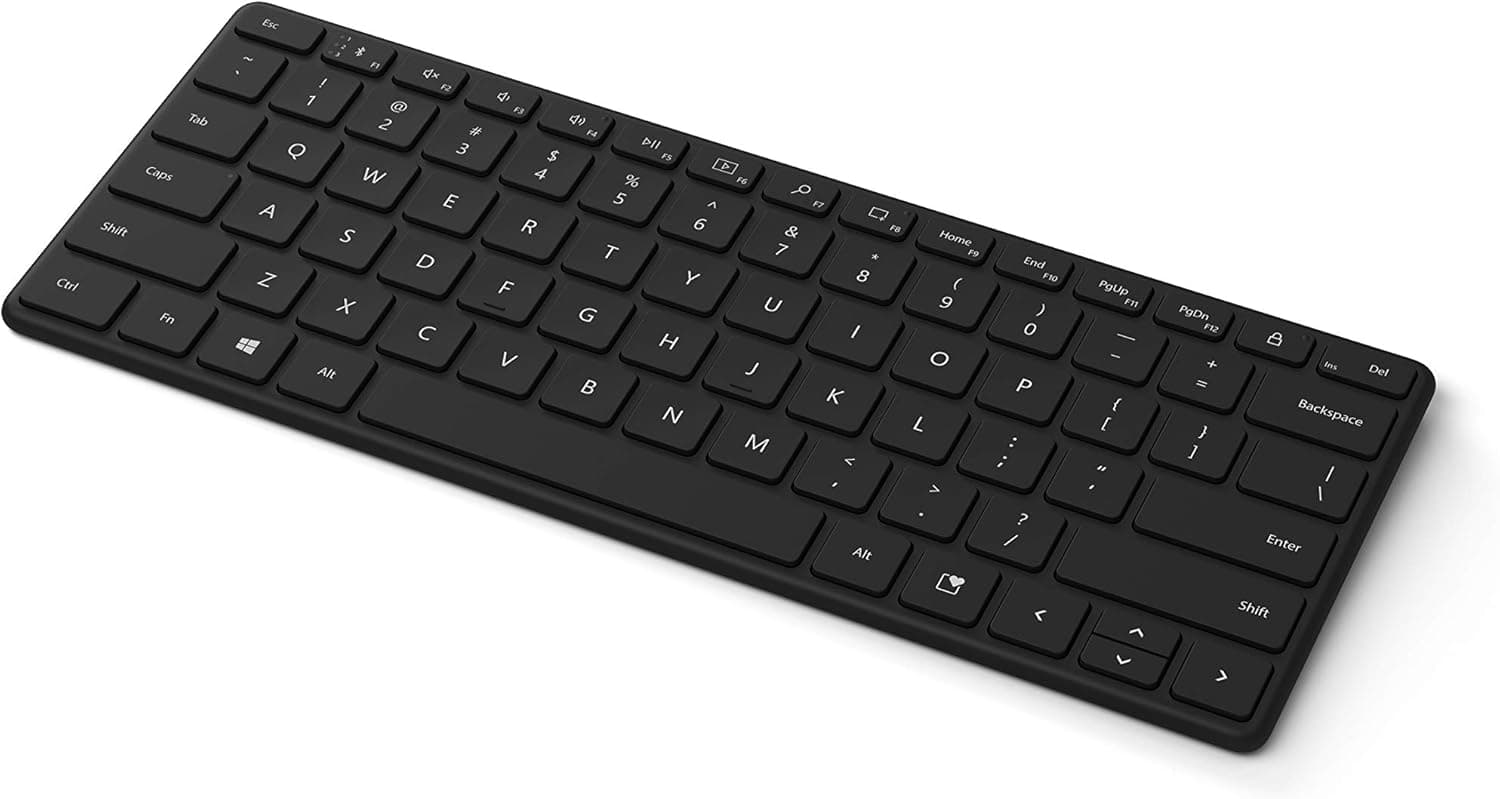
Microsoft Designer Compact Keyboard in matte black, a slim wireless Bluetooth keyboard with a premium minimalist look.
Price range: See on Amazon
What we liked
- + Microsoft build quality and Windows integration are reliable
- + Compact layout saves desk space for a mouse closer to the body
- + Matte black finish looks clean in modern offices
Trade-offs
- - No backlight for typing in dark rooms
- - Compact layout skips the number pad for spreadsheet users
Who this compact keyboard is really for
This keyboard targets people who work at a laptop or desktop and want their mouse sitting closer to the keyboard rather than reaching past a number pad. Microsoft measures the board at roughly 4.63 by 11.41 by 0.85 inches, a footprint small enough to leave real space on a crowded desk for a notebook, a mug, or a second monitor stand. The matte black finish and low profile angle are meant for a tidy home office look rather than a gaming setup. Because it pairs over Bluetooth with up to three devices and lets you switch between them, it also works well for someone who splits time between a work laptop and a personal computer on the same desk. Anyone who types mostly letters and short messages, rather than long columns of numbers, is the target buyer here.
What the layout and connection actually offer
The keyboard uses a standard QWERTY layout with enhanced function keys, a dedicated emoji key, and a screen snipping key for quick captures, features Microsoft lists directly on the product page. It runs on four DL2032 lithium coin cell batteries that come pre-installed, so there is no charging cable to manage day to day. Connectivity is Bluetooth only, with no USB receiver option, and the keyboard is built to work with both Bluetooth-enabled PCs and Macs rather than being locked to Windows. Key spacing and travel are tuned for the compact chassis so the typing feel stays close to a full-size board despite the smaller shell. There is no backlighting on this model, which keeps the price and battery life reasonable but means typing in a dark room means typing by feel.
Living with it on a daily desk setup
Day to day, the appeal of a compact board like this is mostly about desk geometry: with no number pad hanging off the right edge, a mouse can sit directly next to the letter keys instead of several inches further out, which is easier on the shoulder over a long day. The plastic build and matte coating are consistent with other Microsoft Designer-line accessories, so it should hold up to normal home office use, though it is not marketed as spill resistant. Battery swaps should be infrequent since coin cells in low-draw Bluetooth keyboards commonly last many months, though Microsoft does not publish an exact battery life figure for this model. Because pairing supports three devices with quick switching, moving from a laptop to a desktop without unplugging a dongle is one of the more practical daily conveniences here.
Trade-offs against other wireless keyboards
Compared with rivals in the same wireless keyboard category, this board leans toward simplicity rather than extra features. A mini wireless keyboard with a built-in touchpad adds pointer control in one unit, which suits a couch or a small side table where a separate mouse is awkward, something this Microsoft board does not attempt. A foldable travel Bluetooth keyboard trades some typing feel for a pocketable folded size, useful for travel in a way this rigid compact board is not. What this keyboard offers instead is Microsoft's own build quality and a layout tuned for regular desk typing rather than portability tricks. The main gap next to pricier ergonomic or mechanical boards is the lack of backlighting and the absence of a number pad, both deliberate trade-offs for the compact footprint.
Verdict and who should pick something else
This is a sensible pick for someone furnishing a clean, minimalist desk who wants a keyboard that just works over Bluetooth with a laptop and does not eat up space. It is not the right choice for accountants and data entry workers who rely on a number pad daily, or for anyone who regularly types after dark and wants their keys to glow. Gamers and anyone wanting programmable macro keys should also look toward mechanical or software-configurable boards instead. For everyone else who mostly wants a tidy, reliable typing surface next to a mouse, this compact board covers the basics well.
Frequently asked questions
How many devices can the Microsoft Designer Compact Keyboard pair with?
It connects over Bluetooth and can pair with and switch between up to three devices, according to Microsoft's own product listing.
Does this keyboard have backlit keys?
No, this model does not include backlighting, so typing in low light is done without illuminated keys.
What batteries does it use and are they included?
It runs on four DL2032 lithium coin cell batteries, which come pre-installed in the keyboard according to the manufacturer.
Is this keyboard compatible with Mac computers?
Yes, Microsoft lists it as compatible with Bluetooth-enabled PCs and Macs, not just Windows machines.
Prices change often, so check the current price and availability on Amazon.
Check price on AmazonDesk Upgrade Nest may earn a commission from the link above.