Logitech MX Vertical Wireless Mouse Ergonomic Design - Graphite Review (2026)
Updated September 14, 2026 · Research-based review
Our verdict
The MX Vertical suits people with medium to large hands who deal with forearm or wrist fatigue and want a premium mouse that still tracks like a standard one. Its main strength is the 57 degree handshake angle paired with Logitech's dual wireless connections, and the main trade-off is a tall shape and a price above budget vertical mice.
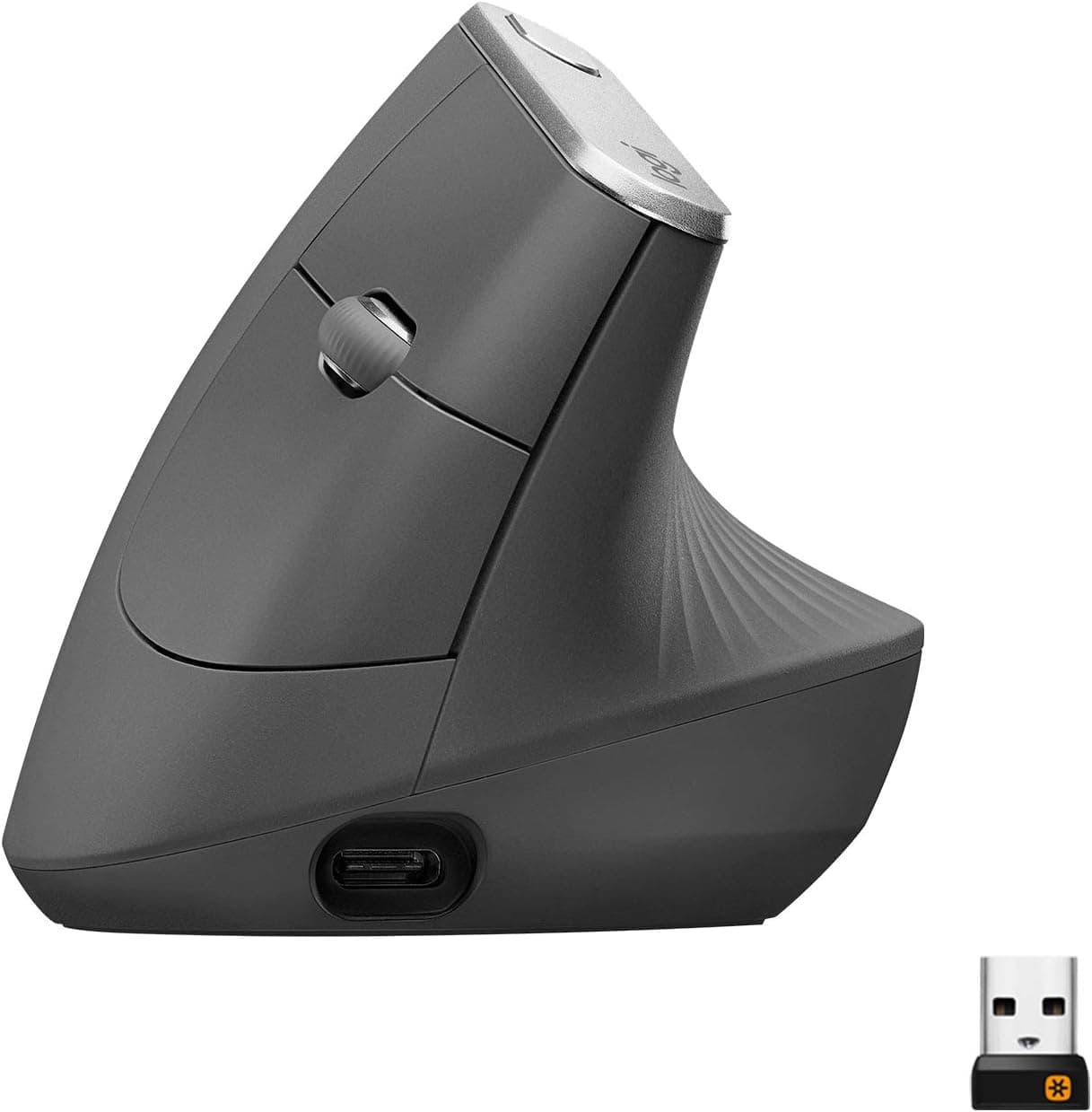
Logitech MX Vertical wireless mouse in graphite, a premium ergonomic mouse with a raised handshake grip.
Price range: See on Amazon
What we liked
- + Vertical angle keeps the forearm in a neutral handshake position
- + Logitech MX line offers smooth tracking and multi-device features
- + Premium build and rechargeable battery suit all-day work
Trade-offs
- - Large shape may not fit small hands comfortably
- - Premium price is high compared with budget vertical mice
Who this mouse is built for
The MX Vertical is aimed at desk workers who already feel strain from a flat mouse and want an ergonomic upgrade without giving up the tracking accuracy of a standard Logitech mouse. Logitech pitches the shape as a good fit for medium to large hands, since the tall body and thumb rest are sized for a full palm grip rather than a compact fingertip hold. It suits people who move between a desktop and a laptop during the day, thanks to dual wireless modes, and multi-device users who want to switch between computers. It is less suited to anyone with small hands, since the raised body can feel oversized, and it is priced above entry-level vertical mice, so budget shoppers may want a cheaper option first.
Angle, sensor, and build explained
The defining feature is a 57 degree vertical tilt, which turns the wrist into a natural handshake position instead of the flat, rotated posture a standard mouse forces. Logitech's technical specifications list the mouse at 4.72 inches tall, 3.11 inches wide, and 3.09 inches deep, weighing 4.40 ounces with its battery, with an optical sensor covering a 400 to 4000 DPI range and a dedicated button to switch tracking speed on the fly. It has four customizable buttons, set by default to forward, back, and a middle click alongside the DPI switch, plus a textured rubber side panel and a thumb rest for grip during long sessions. The graphite finish and matte plastic shell match the rest of Logitech's MX lineup.
Setup, battery, and daily use
The mouse charges over USB-C and uses a 240 mAh battery that Logitech rates for about four months per full charge, with a one-minute quick charge good for roughly three hours of use if the battery runs low mid-day. It connects either through the included Unifying receiver on 2.4 GHz or directly over Bluetooth Low Energy, so it can pair with a laptop without tying up a USB port. Logitech lists compatibility with Windows 10 and 11, macOS 10.15 and later, ChromeOS, Linux, and iPadOS through Bluetooth. Because the wireless range covers about 33 feet, it stays connected even away from the desk, and switching between two paired devices takes only a button press rather than a full re-pair.
Trade-offs and how it compares with other vertical mice
The tall, wide body that makes the ergonomic angle work is also the main drawback for anyone with smaller hands, and the price sits above most other vertical mice on the market, including Logitech's own Lift. In our vertical mice guide it ranks first of seven with a score of 9.2, ahead of the Logitech Lift, scored 8.6 in both graphite and off white, which uses a smaller body and a gentler angle better suited to smaller hands. It also outranks budget options like the E-YOOSO and Lekvey vertical mice, both scored under 8.5, which cost less but use simpler optical sensors and shorter battery life between charges. The gap mainly comes down to build quality and the smoother multi-device switching the MX Vertical offers.
Verdict and who should pick something else
Anyone with medium to large hands who wants a premium vertical mouse with reliable dual wireless connections and strong Logitech tracking should be well served by the MX Vertical. Our score of 9.2 out of 10 reflects an excellent fit for ergonomic use and solid features and build, with value scored slightly lower simply because of the higher price against other vertical mice. Shoppers with small hands, or anyone who wants a gentler vertical angle at a lower cost, should look at the Logitech Lift instead, and budget-focused buyers may prefer the E-YOOSO or Lekvey models. For serious daily use and long-term wrist comfort, though, the MX Vertical remains a strong pick.
Frequently asked questions
What is the DPI range of the Logitech MX Vertical?
Logitech lists a sensor range of 400 to 4000 DPI, with a dedicated button on the mouse to switch tracking speed.
How long does the MX Vertical battery last?
Logitech rates it for about four months on a full charge, and a one-minute quick charge over USB-C provides roughly three hours of use.
Does the MX Vertical connect over Bluetooth or a receiver?
It supports both, connecting through the included Unifying receiver on 2.4 GHz wireless or directly over Bluetooth Low Energy.
Is the Logitech MX Vertical good for small hands?
Logitech describes it as a better fit for medium to large hands, so people with smaller hands may find the tall body less comfortable than a compact vertical mouse.
Prices change often, so check the current price and availability on Amazon.
Check price on AmazonDesk Upgrade Nest may earn a commission from the link above.